Author - Ripper71

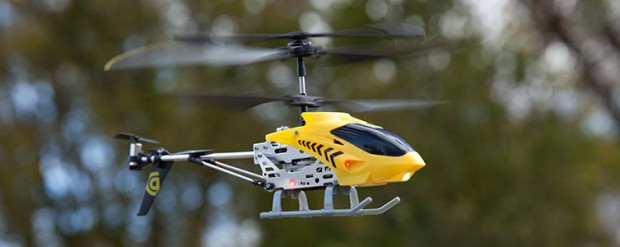
Griffin Helo TC Chopper Review

helotcchopper-outside-1

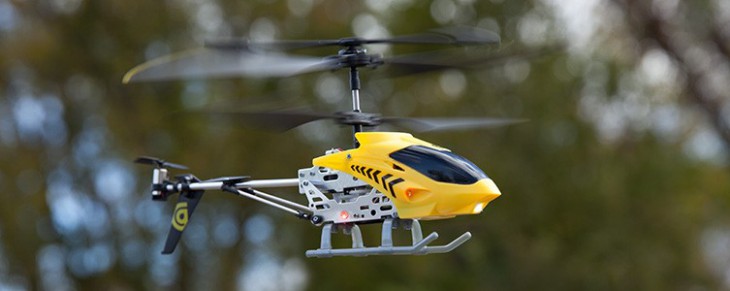
I am definitely the gadget guy of GamingShogun.com, when I hear the whirring of little machines or flashing lights, I’m drawn in like a moth to a flame. As a result, events like CES can be a hazardous for me as I am pulled in so many directions at once. A good example of this was walking into the North Hall of the Las Vegas Convention Center and seeing a remote control helicopter go zooming through the air in front of me. If they had held up a flashing sign saying “Come Look At This!” I don’t think I would have been pulled over faster. Arriving at the Griffin booth, I saw they were trying to fly the chopper through a giant “G” hung in the rafters and circling a track with a bunch of RC cars. They must have thought I was a stalker I stopped by so many times over the week. Once I got the chopper and car home the next challenge was stopping from playing with them long enough to write them up.

01101444_52cf88b1680b6

Helo TC Chopper Features:

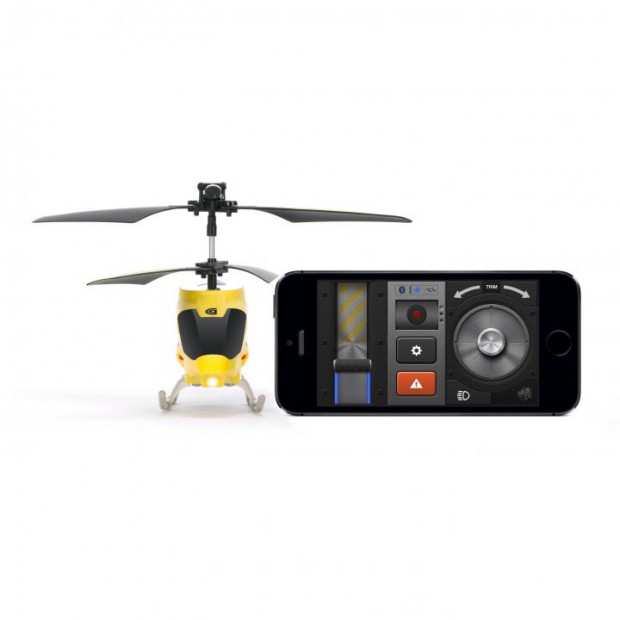
  •  Control the chopper from your iPhone, iPad or iPod touch using the HELO TC Chopper app (a free download on the iTunes App Store).
  •  Use joystick controls on your Multi-Touch display, or tilt your handheld device to fly
  •  Make up missions and record up to three flight plans for later recall
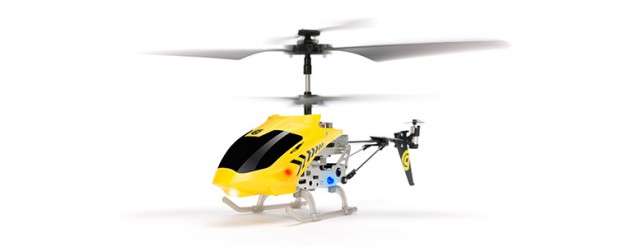
  •  Controllable ultra-bright LEDs
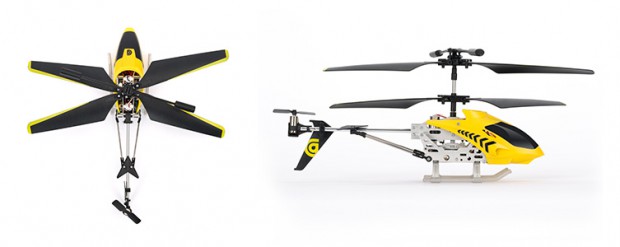
  •  Metal interior frame and body
  •  No batteries or extra remote required

Hands On:
Griffin has been in the RC helicopter game for a few years now and they just refine them more and more with every generation. They have been using cell phones as part of the controller for years but with their latest offering, they have been able to refine the process even more. The system required an attachment to your phone volume jack that would receive audio cues and translate them into movements. Now there are no more attachments and everything is controlled via Bluetooth technology. As a result all you need to do is download an app, turn on your Bluetooth, fire up the Helo TC and away you go! This makes the system really portable and quickly playable, which are two issues that can cause other RC mini-copters to spend more time on a shelf than in the air.

helotcchopper-gc37841-3

The versatility of controls is another reason this copter will get lots of air time. The virtual controls are easy to get the hang of and provide the sensitivity you might want for buzzing obstacles in tight flybys or you can go with tilt control using your phone and make the controls hilariously entertaining to watch. If you have never seen someone use tilt controls with a phone they tend to tilt their body as well instead of just their hands, in this case the chopper is parroting the movement as well. Luckily the Helo TC is made with a metal interior frame because unless you have a VERY roomy space to work with the chopper is gonna crash a few times while you get used to tilt controls.

One of the things that really sets this helicopter apart from others is the ability to record flight plans. I love this idea because once you get good at controlling it you can record some crazy cool flights around obstacles and through different rooms and save it so that later all you have to do is set the helicopter down in the same place, choose your recorded flight and then watch it go through the motions while you watch. If you want to have fun making movies using the Helo TC you can know where to record and record multiple times to edit them together and as long as their isn’t too much environment changes between flights they should edit together really nicely. You just start the flight plan and do whatever you want around it. Plus you can have three recorded flight plans, that’s three scenes in your movie to work with!

helotcchopper-gc37841-1

Last Call:
I’m a huge fan of the simplicity of getting started with and the versatility of the Helo TC – both in its controls and its programmable flight plans. I’ve been injured lately and laid up a lot and yet I can still take the Helo TC Chopper off from my bed and fly it around the room. The more mobile I am the more possibilities of use open up with Helo TC, I don’t think our readers have seen the last of it, I have cinematic plans for this baby.

[easyreview title=”Griffin Helo TC Chopper Review Score” cat1title=”Overall Score (out of 5)” cat1detail=”” cat1rating=”5″ ]

[button target=”_blank” style=”” link=”http://gamingshogun.com/gamingshogun-rating-system/”]Learn About Our Rating System[/button]
(Note: this video shows the older version of the Helo TC when the plugin remote was still required, but it is a great little movie!)

Shutterball Remote Shutter For Smart Phones (Mobile/Tech)

1231446_319384294873130_177813665_n

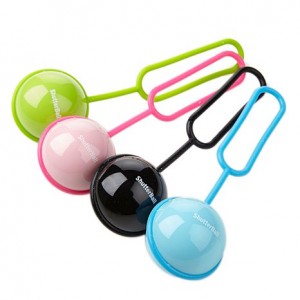
At CES everyone who passed the display with the little balls on rubber dongles had to pick them up and hold them. I was no different, there was just something about the little buggers. Once I got a hold of one at home and found out what it did it was even harder to leave alone. Turns out they were “Shutterballs”, little remote shutter controls for your smartphone that enable you to take “selfies” at farther than arm’s length.

Features:

  •  Simple Press of the ball releases the shutter
  •  Perfect for selfie or group portraits without distortion or contortion
  •  Easily snap group photos from up to 60′ away
  •  App triggers your smartphone camera for sharp still or video
  •  Loop onto your jeans, bag or keychain
  •  Coin cell battery pre-installed lasts up to 5 years

1010357_295468367264723_157305195_n

Hands On:
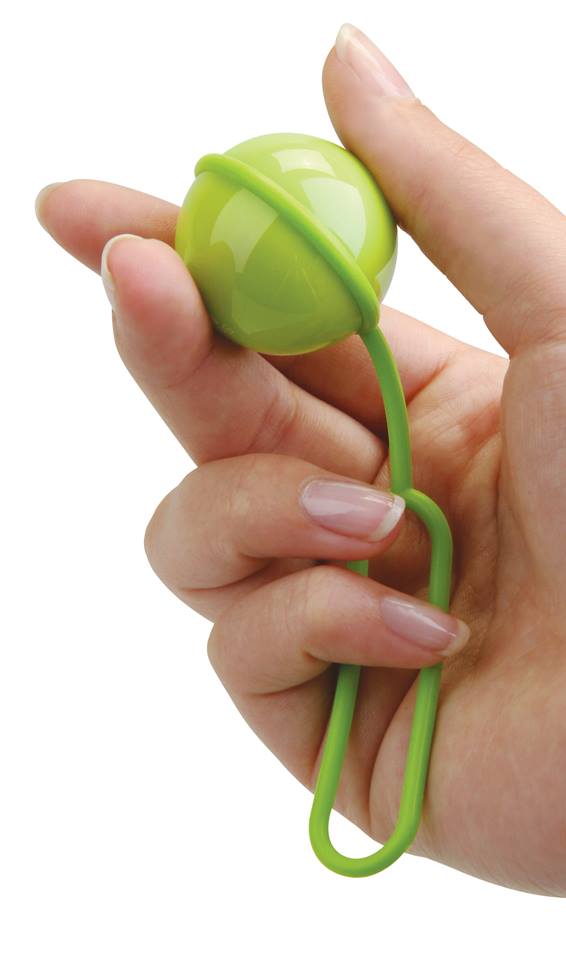
Pairing is as simple as downloading a free app and following the on-screen instructions. Once you do, the ball works the same as if you pushed the shutter button on your phone. So, if you have the phone set to take pics from the front camera then hit the button on the ball it will take from the front camera, same setup for the rear camera. This is handy if you are on vacations and want to get monuments or landscapes in the background of your selfie, you aren’t limited by proximity. The Shutterball is small enough to hide in your hand easily by just curling your fingers around it. This is handy if you get any color other than black because that way people won’t be wondering what that bright colored thing in your hand is.

The best use of the Shutterball that I can think of is that you can use it to remotely take video as well. This is great if you want to shoot some kind of video project or message using your phone. You can do a “standup” at an event or even set the camera where you want and with the push of the ball start recording a skit in front of it. If you want to keep the camera in the exact same spot for two shots, maybe one with you in it and one with you out of it so you can make yourself “disappear” you don’t have to worry about accidentally moving the camera between takes while pressing the button, it is all remote.

audiovox-shutterball-smartphone-remote-shutter-control-d-00010101000000292377_alt1-300x300

Last Call:
The Shutterball is a simple thing with tons of possibilities that will help take your photography and videography to the next step. It’s inexpensive, $24.99 dollar price point makes it budget-friendly and I expect the Shutterball to catch on like wildfire once word starts to spread about it.

Product Link

[easyreview title=”Shutterball Remote Shutter For Smart Phones Review Score” cat1title=”Overall Score (out of 5)” cat1detail=”” cat1rating=”4″ ]

[button target=”_blank” style=”” link=”http://gamingshogun.com/gamingshogun-rating-system/”]Learn About Our Rating System[/button]
LEGO Star Wars: Microfighters Review (iOS)

screen568x568abc

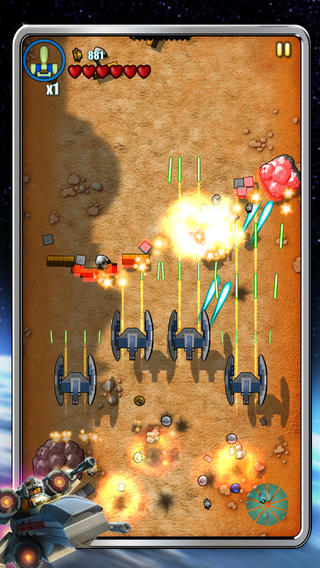
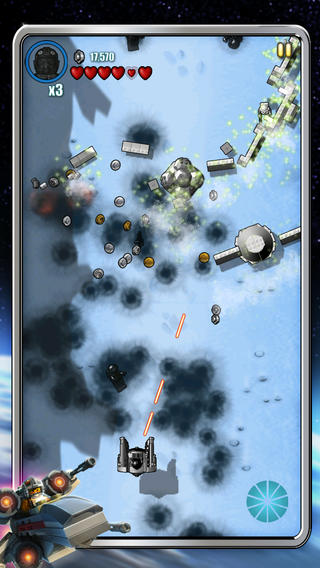
Those old enough to remember Galaga will know that its gameplay has been copied by an incalculable number of games in the time since its release. You have a ship that moves around the screen and the enemies scroll down toward you. Since the days of that game, most often the background terrain scrolls too and can be shot at but the concept remains the same, a downward scrolling ship shooter. There’s nothing wrong with reusing the formula, quite the opposite it makes for a nice quick jump in and play style and lends itself perfectly to the iOS platform in particular. Now, add LEGO Star Wars as the theme and you have an instant hit, especially for $.99!

Description:
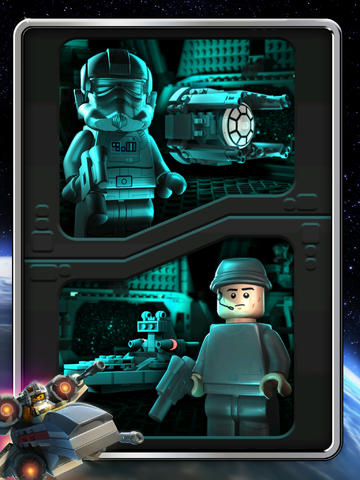
Get ready to step into the LEGO Star Wars: Microfighters’ digital universe for fun, blasting action! Playing with your Microfighters toys just became more fun as you can wield them on the go with your mobile device. Pilot up to six iconic LEGO Star Wars ships like TIE fighters and X-wings as you destroy enemies, collect studs, and control the galaxy!

lswmfscreen568x568

Features:

  •  Fly for the Rebellion or turn to the dark side and play as the Empire.
  •  18 levels of action spread over four planets – Endor, Yavin, Hoth and Geonosis.
  •  Pilot six iconic Star Wars Microfighters: TIE fighter, X-wing, Star Destroyer, Droid ATT, Millennium Falcon (the fastest ship in the galaxy!) and Clone Tank.
  •  Collect studs to spend on equipment, super weapons, and upgrades for your Microfighter.
  •  Over 35 types of enemies to blast.
  •  Eight level Bosses to defeat.
  •  Destructible terrain.

Hands On:
The designers didn’t try to over-complicate the play process, they actually simplified it from many other games of its kind. You move the ship around the screen with your finger and it automatically shoots. Tap the screen twice to use any purchased power-ups, that’s it.  You live or blow up into little Lego pieces based entirely on your eye-hand coordination.

Don’t let that fool you into thinking that the game is then too easy or somehow boring. This is probably my favorite downward scrolling ship arcade game that I have ever played, and I have played a lot – including one called 1942 that was super difficult to get through. What it really comes down to is theming and art design. The gameplay is pick up and play, the style has been around for decades, but hearing the Star Wars music, flying the ships and blowing up enemies which become a cloud of LEGO pieces is just insanely fun. This game should never be played without the sound, it would be like watching a Star Wars movie without hearing the score. You get to play both sides as well so you get to fly iconic ships and you go through iconic worlds blowing up rocks and asteroids as well as enemy ships and barricades. The levels are challenging and there are bonus items to unlock which keep you working at it.

Lego-Star-Wars-Microfighters-4

Last Call:
This game is not a new concept but when put in this theming LEGO Star Wars Microfighters is a hard game to put down and a blast to play. It is all about hectic battles with iconic ships to an amazing musical score. The game is a great deal at $.99!

[easyreview title=”LEGO Star Wars Microfighters Review Score” cat1title=”Overall Score (out of 5)” cat1detail=”” cat1rating=”4″ ]

[button target=”_blank” style=”” link=”http://gamingshogun.com/gamingshogun-rating-system/”]Learn About Our Rating System[/button]
NuGuard GripStand 3/GripBase Bundle Review (iPad)

gripstand2_blk_gall2

It has taken a number of years to accept the degenerative disk disease that has developed throughout my spine. That, coupled with bone spurs, mean I can just about get a full day out of bed if I push myself – then I can expect at least a couple days in bed to recover. I often have to use a cane to get around and generally require high doses of medications to keep the pain in check. In other words, I am physically challenged now which often has me trying to find ways I can improve the quality of my life without increasing my pain level. One of the most straight forward methods is to use portable devices for gaming, social interaction and writing. For this, I often turn to my iPad. However, the iPad, particularly in the writing department, can be a slow, cumbersome process. When it comes to entertainment, like watching Netflix, I find myself propping it on pillows and adjusting my body around the device which is not an optimal solution. When I told the folks at NewerTech about this, they sent us a NuGuard GripStand 3 and NuGuard GripBase right away. Time to find out if it will help me be more comfortable in using my iPad!

NuGuard GripStand 3 Features:
The NewerTech NuGuard GripStand 3 is a multipurpose tool for your Apple iPad 2nd, 3rd & 4th Gen. The hard plastic protective shell grips your iPad 2nd, 3rd or 4th Gen snugly while enveloping it in a shock-absorbing inner rubber liner. The removable, desktop stand can be swiveled 360° and positioned at virtually any angle for viewing or typing. The desktop stand also doubles as a highly effective one hand grip so you can use your iPad 2nd, 3rd & 4th Gen while standing or walking. Take presentations to the next level, the NuGuard GripStand 3 handle can even be rotated to use as a hook to hang your iPad 2nd, 3rd or 4th Gen on the wall in either landscape or portrait orientation.

gripstand2_blk_gall5

– Use the desktop stand as a handle to carry your iPad 2nd, 3rd or 4th Gen like a briefcase. Or, when travel bag space is a consideration, just twist the desktop stand to remove it.
– Also includes a nylon strap to securely mount your iPad 2nd, 3rd & 4th Gen to a headrest for easy viewing.
– GripStand 3 fits seamless with Apple’s SmartCover

NuGuard GripBase Features:
When you want to turn your iPad 2nd, 3rd & 4th Gen into a desktop workstation, the GripStand’s shell locks into the GripBase to provide a fully adjustable viewing angle in landscape or portrait modes along with 360° rotation. The wide, weighted base makes it virtually impossible to knock over and perfect for high traffic areas.

Hands On:
I had been looking for an iPad stand that was on a clamp mounted base with an arm so I could swing it out over in front of me when I was in bed. At first, I wasn’t sure if this particular system would really fit my needs. The GripStand was very easy to put my iPad into and take out of if needed, and the stand converted into a briefcase like handle, which worked great with my needing to use a cane and the handle not requiring a flat surface. The GripStand even comes with a nylon strap so that you can velcro it onto the back of a seat and use it on the move. It converts between a handle and stand so quickly and easily that it almost seemed effortless.

newertechnuguardgripstand34

Still, when in bed, it could sometimes be a little harder to get into just the right position for typing on it. That is where the GripBase came into play and really surprised me. It was easy to assemble and attaching the GripStand case to the GripBase attachment head was not only easy but the grip on the case was secure enough that I didn’t have to worry about it coming off. Keeping the iPad slightly elevated the GripBase could be spun 360 degrees, rotated 360 degrees, adjusted to any angle and secure enough once you get it to that angle that it will stay in place during use.

That is where the system really proved itself useful to me. The weighted base made the iPad stay securely in position not just on my nightstand but also if I put it on the bed or a pillow on my lap. If I used my wireless keyboard with it, I could adjust it like a monitor but since my keyboard has been a little unreliable the fact that I could just turn it landscape and type on the keyboard without the whole thing shifting under my hands was the real saving grace. I could even play touchscreen games easily, especially those ones where you wish you had one arm to hold the iPad and two more to play the game.

4f3468d1b472ca7eee4a3b2d59ab1218

Last Call:
I’m really grateful to have the NuGuard GripStand/GripBase Bundle to help with my physically-challenging needs. This bundle takes my iPad from being a mostly game and entertainment platform and allows it to become a work system akin to a laptop, maybe better since the screen is far more adjustable. I recommend it for anyone who has an iPad and wants to be able to work in different environments but I seriously recommend it for those who just can’t sit at a desk, it can be a life changer.

[easyreview title=”NuGuard GripStand 3/GripBase Bundle Review Score” cat1title=”Overall Score (out of 5)” cat1detail=”” cat1rating=”5″ ]

[button target=”_blank” style=”” link=”http://gamingshogun.com/gamingshogun-rating-system/”]Learn About Our Rating System[/button]
Trident Kraken A.M.S. Case Review (Mobile)

kraken-2014

I have tried many phone cases of the last year and there are a few favorites that I rotate between depending on what my usage plans are. If it is a situation where I will want heavy duty protection I always go to the one which I risked my phone the most to test: The Trident Kraken A.M.S. case.

Hands On:
First thing that needs to be noted is that because I am using the iPhone 4s I am using the older model Trident Kraken which has been greatly updated for 2014 for new model smartphones. Here’s the difference:

New Kraken
The new Kraken A.M.S. is now 20% slimmer, featuring over-molded shock-absorbing TPE and hardened polycarbonate in the interior and exterior of the case. Perseus A.M.S. not required.

kraken-2013

Old Kraken
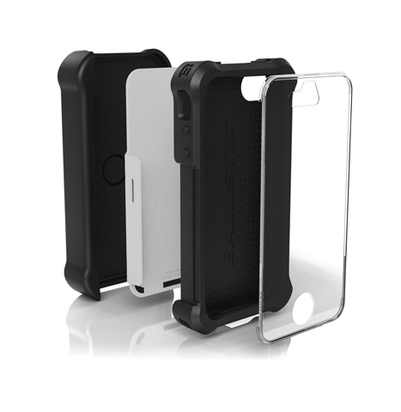
This Kraken A.M.S. is an upgradable case, that transforms the light-duty Perseus A.M.S. case into the heavy-duty Kraken A.M.S. case. Perseus A.M.S. required.

So if you are working with an older phone like mine you may have to go with the Perseus/Kraken combo which I personally like for a couple reasons.  When taking a heavy impact I found that the rigid Kraken case would often pop apart as if redirected the impact of the shock protecting the phone.  The Perseus case would stay on no matter what keeping the phone nice and clean.  The other reason I liked the combo was it gave you three choices on how to use the cases, just the Perseus, the Perseus with the front plate of the Kraken, or all three pieces.  Admittedly since this was the case I used when I wanted crazy heavy duty protection I usually used all three which was probably the reason for doing away with the combination as well as enabling them to slim down the case so much which can be considered bulky on older models.

trident-iphone-4-4s-kraken-a-m-s-case-and-holster-black-main-view

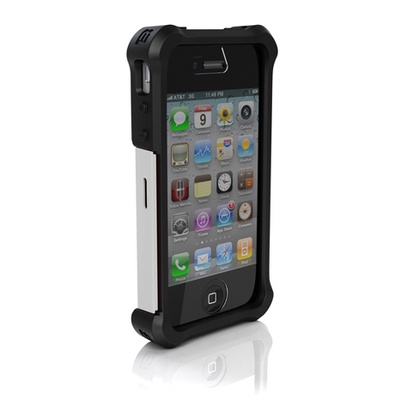
Regardless of which model you get, you can count on profound protection to rival any other high end phone case on the market.  I compared it with one of the most popular cases and found that the Kraken with the rubberized interior and corners was easier to remove from your pocket than others that have their rubber portion on the outside.  The corners of the rubber still stick out from within to provide corner shock protection but the hard shell is able to pop apart pulling the kinetic energy of impacts away from the phone.  The Kraken corrects a basic issue with iPhones which is redirect the speakers at the bottom towards the front.  These redirection ports also decrease the size of the ports to better protect the phone from water and dust damage at that location, an area not protected or redirected by most phone covers.  Probably my personal favorite feature is it has a built-in front screen protector that has the best touch sensitivity of any I have seen on the market.  I suppose that after time and impacts this screen could be damaged enough to lose effectiveness but I haven’t had that problem in the year I have used this model.

I could get into the science of why this case works so well but that would get boring.  Instead if you look up “Trident Case test” on YouTube you will find all kinds of crazy tests the cases have been put through.  My personal favorite was backing over it with a Mustang while the phone’s camera is on so you see the wheel come crashing down on it.  The case took some damage but the phone was in perfect shape.  The tests were so convincing that I decided to test the case on my own and purposely dropped my phone and send it skidding across a gravel parking lot.  My friends all gasped and went diving for the phone and were stunned that not only was the phone fine but their wasn’t a single scratch on the case.

trident-iphone-4-4s-kraken-a-m-s-case-and-holster-black-vertical-kickstand-view

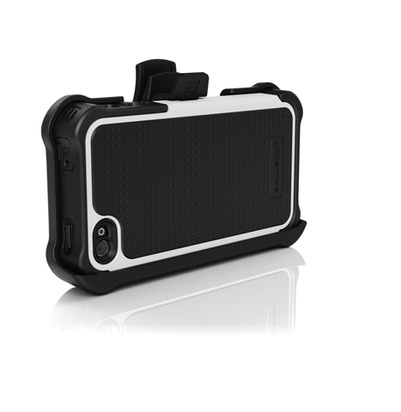
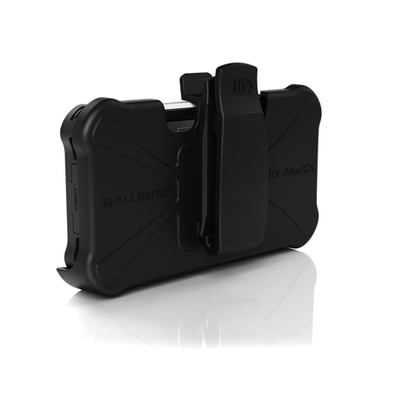
If all of this wasn’t enough the phone also comes with a hip clip and a metal kickstand.  The newer model of Kraken cases improved some major issues in the older clip which I treat with far more care than the phone case but it is still functional as long as you are careful not to hit it on things (I just keep my phone in my pocket, my keys can’t scratch it).  The metal kickstand is probably the best kickstand for a phone on the market and you can remove it to use brackets, clips or even a tripod mount in the clip’s place making the phone mountable just about anywhere.

Last Call:
I recently got a new older model of the Trident Kraken A.M.S. case but not because of product issues, it was simply so that I had more color options.  My last one was a fairly bright blue which looks nice and like a lot of protective cases on the market but my new one is a nice simple black which if anyone has seen me dress in person knows is the color I tend more towards.  When I get a new phone I plan to get the newest Trident Kraken case and review it for you folks and no doubt put it to good use.  My old phone will be handed down through the family and you can bet that the Kraken A.M.S. case will be handed down with it which should be testimonial enough.

[easyreview title=”Trident Kraken A.M.S. Review Score” cat1title=”Overall Score (out of 5)” cat1detail=”” cat1rating=”5″ ]

[button target=”_blank” style=”” link=”http://gamingshogun.com/gamingshogun-rating-system/”]Learn About Our Rating System[/button]

NuGuard KX Phone Case And Screen Armor Review

kx-hero-eagleshield-title

There are three phone cases I rotate through depending on my current needs.  If I plan to be in a situation where I am liable to drop my phone, I tend to go with my bulky/rugged case. If I will be running around but less likely to drop my phone, I go with a medium case. If I am planning on business travel, I go with a case that combines simple elegance with a slim design that can still handle unreasonable levels of damage and that case is the NuGuard KX case for the iPhone 4s.

Description:
Offers X-treme protection against accidental drops, impacts and scratches without sacrificing looks or adding bulk!  The KX uses state-of-the-art X-Orbing gel technology to absorb and evenly distribute kinetic energy for ultimate protection!  This patent pending design allows for protection against accidental drops, impacts and scratches with a lightweight & thin design versus the added bulk found in other more expensive cases that attempt to provide this level of protection! Hyper-advanced X-Orbing gel made in U.S.  Additionally goes great with NuGuard KX three-layer screen armor.

Hands On:
The case itself looks non-descript with light swooshes on it and the words “NuGuard KX”. The inside is lined with felt to keep the phone from being scratched during a fall and to make it easier to remove from the rubber lining of the inside case. The one I am using right now is beige on the outside with a brown interior gel. It looks classy and simple, understated is definitely a word that can describe it since they test it well beyond “military” standards. Military drop standards is about four feet and requires an object to not break after 25 quick successive drops from that height. As a result plenty of cases with the “military dropped certified” isn’t even dropping from the average person’s ear level. So the more serious companies do much less conventional and impressive tests.

NuGard-KX-iPhone-case-all-colors,std

NuGuard is famous for dropping their KX line from a 200 foot wind turbine to the ground below without damage. The video is below as well as other tests they have done on their cases to show that even though they have taken the bulk out of the case it will still be able to handle more than an average drop. My confidence is so high about it that last night I was laying in bed and threw the phone across the room where it bounced off a hard surface then went cartwheeling into the bathroom without a single problem or damage to the case or phone. In other words if it can handle a klutz like me you should be fine.

The folks at newertechnology were nice enough to even include their NuGuard KXs Impact X-Orbing Screen Armor. This is a triple layer system protects from fingerprints and smudges on the top layer, extreme impact protection in the middle and a self-adhesive layer. There are videos to show just how crazy they are about testing this as well because though I trust it I still can’t bring myself to hit my phone with a hammer.

Last Call:
NuGuard KX Phone Case and KX Screen Armor are an ideal combination for making your phone look nice and business appropriate while being prepared for the harsh environments life can offer. No bulky industrial looking profile but more protection than the average person would ever need.

[easyreview title=”NuGuard KX Phone Case Review Score” cat1title=”Overall Score (out of 5)” cat1detail=”” cat1rating=”5″ ]

[button target=”_blank” style=”” link=”http://gamingshogun.com/gamingshogun-rating-system/”]Learn About Our Rating System[/button]

Product Videos

Monster Jam Review (iOS)

screen568x568a

When I was younger, I remember going to tractor pulls and seeing legends like Bigfoot and my favorite, Grave Digger. Well, not only are monster trucks still around but they are now a show of their own and the Grave Digger has spawned a whole family of ‘Diggers. So what better way to pass the time between events at one of the shows (or just standing in line at the DMV) than playing some monster trucks on your phone through a free app called Monster Jam!

Description:
Bringing the family-friendly entertainment of live Monster Jam events straight to your tablet or mobile phone all year round, Monster Jam is an authentic and dynamic mobile gaming experience! Monster Jam will not only allow you to relive your favorite Monster Jam moments but to create your own memorable monster truck stunts using all the biggest names in Monster Jam, including Grave Digger, El Toro Loco, Maximum Destruction and Monster Mutt! Smash through barriers in actual Monster Jam® events and races, or freestyle through unique environments and hill climbs!

screen568x568c

Features:

  •  16 fan-favorite licensed Monster Jam Trucks recreated in breathtaking detail!
  •  Classic Monster Jam Arenas to compete in, including Anaheim, Georgia and Houston.
  •  Unleash your Truck upon unique and astonishing HD environments such as downtown Tampa, Detroit and Jacksonville.
  •  Unique and distinctive game modes including racing, jump stunts, towing competitions and freestyle!
  •  Experience new content every month when updates bring more trucks, new environments and extra game modes!
  •  Convincingly accurate 3D physics simulation!

Hands On:
I was extremely excited to get into the game and wanted to get behind the wheel of one of the Grave Diggers right away. Well, first you have to start with one of the lesser-known monster trucks and work your way up to the big boys. So, instead I chose Blue Thunder (you can pay real life money or earn some by like the developer’s page, but it still costs twice as much gold for the higher trucks). The trucks take a bit of getting used to, tilting the phone turns the truck and swiping the screen speeds it up. You can also tap powerups on the side of the screen that you purchase with gold. I spent my first few times turtling my truck after which I was able to run around in some fashion though never as neatly as the AI.

screen568x568b

The freestyle is particularly fun since you just cruise around jumping and crushing. The races get your heart going because you are doing so many different things on your phone that it is hard to keep track of whether you have the lead. The jump race is great because watching these trucks soar is quite a sight. Probably my least favorite of the events is the pull test which is kind of funny since that used to be one of my favorite in person, maybe it has something to do with seeing the mud kick up so high in at an actual event. It has the simplest controls of the different modes but just felt like you were swiping your phone for a long time. In the virtual world, jumping and crushing cars are the total way to go.

Last Call:
Monster Jam for iOS is a very fun game, especially if you are a monster truck fan. You have to earn or pay your way into a Grave Digger, but you will also have fun in the process. If you want to keep your cash in your pocket this game is completely playable for free, you just have to have patience and earn your way up.

[easyreview title=”Monster Jam Review Score” cat1title=”Overall Score (out of 5)” cat1detail=”” cat1rating=”3″ ]

[button target=”_blank” style=”” link=”http://gamingshogun.com/gamingshogun-rating-system/”]Learn About Our Rating System[/button]

SanDisk Connect 64 GB Wireless Flash Drive Review (Tech)

SanDisk-Connect-Wireless-Flash-Drive-1

We at Gamingshogun.com got a double dose of goodness when it came to SanDisk and their new wireless media systems. The GamingShogun himself got some fun time with the SanDisk Wireless Media Drive and I got to try out the SanDisk Connect 64 GB Wireless Flash Drive – which has just about the same functionality at a slightly more affordable price.

Room in my pockets is always an issue for me, yet I can’t leave home without a flash drive. I have on more than one occasion worn them like a string of shark teeth (ed. note: Or zombie ears!) on a necklace so that I would have all my portable storage where I need it. Yet that never really helps me with transferring pictures and video off my phone, something I am pretty sure the entire Gamingshogun.com gang are guilty of not doing often enough. All this is where the SanDisk Wireless Flash Drive comes into play.

It simply looks like a slightly larger than normal flash drive and acts like one too, you can plug it into a computer and transfer files and charge it via a built-in USB tip. Where it’s different is the functionality it shares with the SanDisk Wireless Media Drive. It becomes a portable Wi-Fi media server for your iOS or Android devices. You can connect to up to 8 devices and you can stream three channels of video at once (that’s two less channels than the Media Drive). It carries a four hour charge and also comes in 32 GB or 64 GB size with expandable memory by SD card. Basically, the trade off between the two is one has a smaller battery charge and less streaming capacity but comes in at a lower price tag.

Whether you choose the SanDisk Media Drive or The SanDisk Flash Drive you are doing yourself a huge favor by entering a whole new world of file transferring and viewing. The device frees up valuable disk space on your smartphone or tablet while allowing you to keep those pictures and videos handy. Just mind the official GamingShogun.com warning and keep your eyes on the road!

[easyreview title=”SanDisk Connect 64 GB Wireless Flash Drive  Review Score” cat1title=”Overall Score (out of 5)” cat1detail=”” cat1rating=”5″ ]

[button target=”_blank” style=”” link=”http://gamingshogun.com/gamingshogun-rating-system/”]Learn About Our Rating System[/button]
Typo Keyboard Review

Typo-Keyboard-iPhone-5-5S-Protection

In high school I was able to palm a basketball easily. One time in a fight I held a guy by the neck halfway up a wall while I talked to his friends about staying out of it. My nephew used to love that I could hold his entire face and half his head in one hand. In case this isn’t getting the point across I have big hands, and my thick fingers will never be piano friendly. For that matter they have one heck of a time typing on a phone. I use auto-correct like a wing man, it saves my butt on a regular basis but it has even begun to believe that I spell the “tge”. I know I am not alone, there are people out there who have multiple phones of multiple brands so they can text on one and get work done on another. Still certain work has been given up on, just because WordPress is available on a phone doesn’t mean it is usable with that phone’s keyboard. Apparently this isn’t a problem for just us lowly folks because so big wigs have tried to do the best thing since combining peanut butter and chocolate into a little cup. They created the Typo Keyboard.

Description:
An iPhone keyboard case that attaches to your iPhone 5 /5s. Finally keys you can type on!

Features:

  •  Type Faster w/ Fewer Typos: Users report typing 50% faster and with less Typos
  •  Release your Screen: Touch keyboard brings back 40% more screen space for typing
  •  Full Backlit Keyboard: Backlit Keyboard for typing in low light environments
  •  Battery Indicator: See how much battery you have at any time
  •  Quick Currency Keys Access: Quick access to all your most necessary currency keys
  •  TYPO smart Typing: Custom TYPO Smart Auto-Correct Enabled

Hands On:
First thing that has to be addressed is the elephant in the room: this keyboard looks just like the keyboard of a Blackberry. That being said the similarities would make sense since the Blackberry is probably the one that the founders Ryan Seacrest (yes that Ryan Seacrest) and property mogul Laurence Hallier were using as secondary phones when they commissioned the keyboard to be invented. It also makes sense because that is the keyboard people who have used external phone keyboards have gravitated towards, the cool thing about this one is that it is a removable keyboard in case you just want to use your screen or it’s battery runs out.

The keyboard is backlit which is nice for folks used to screen keys but each key has a raised edge on it so that you can quickly and easily locate the right key. Being able to use alt key to get to the numbers is really handy and faster, I even like the relocating of the home button. It doesn’t add that much length to your phone, it frees us a lot of your screen by not having the keyboard on it and the width is actually less than most cases. The keyboard charges separately so it doesn’t drain the phone’s battery and there is an indicator on the screen of how much battery it has left, the battery lasts between 7-14 days depending on usage. Also it is just bluetooth pair and play, so if the battery does die or a friend borrows the phone who can’t stand the keyboard you can turn off bluetooth and take it off. If all that isn’t enough it has it’s own auto-correct that is designed with the keyboard’s most commonly made typos in mind.

typo-keyboard-iphone

Now for the drawbacks. With the home button covered it is less convenient to navigate the touch screen because you have to go to the lower corner of the keyboard then back to the touch screen each time you want to use the home button. Apple’s latest iOS increased the button size to make typing on the touch screen much easier than it used to be making the size difference in the keys nominal. A plus and a drawback is the fact that the keys make noise, if you like the satisfaction of hearing your keys pushed to know you pushed them it is nice, however if you are texting a lot the clicking could get annoying to those around you. Lastly if you have big mitts like me then this keyboard will help a little with your typos and finger placement, but not that much.

Last Call:
If you like typing on a Blackberry better than typing on an iPhone but love all the iOS apps and such then this is the perfect case for you. If you tend to be typotastic or a slow typist then this might help, users have reported a 50% increase in speed with fewer mistakes. If you just have big hands you might want to look into a side slide out keyboard case because the keys aren’t that much bigger. Overall the Typo Keyboard might just be able to cut down the number of phones you have to drag around or improve the usage of the one you have.

[easyreview title=”Typo Keyboard Review Score” cat1title=”Overall Score (out of 5)” cat1detail=”” cat1rating=”4″ ]

[button target=”_blank” style=”” link=”http://gamingshogun.com/gamingshogun-rating-system/”]Learn About Our Rating System[/button]
Anker Astro External Battery Review (Tech)

cf0e7865-e21e-4ba6-b714-20f70c1f6fe2

I was having issues with my iPhone 4S right before CES, problems with battery charging. I took it into the Apple Store where they said it was fixed, and I went home to the same problem. So, thinking maybe part of the problem was the foot-dragging I was doing regarding updating to the latest iOS, I updated and headed off to CES. That’s when I found out my phone was dying. A lot. I was having better charging luck but the charge was being suck down like a milkshake on a hot summer day. As luck would have it, one of our first stops at CES was at the Anker booth where I met my new little buddy, the Astro the External Battery.

The Description on the box says “Scanning the walls for open outlets wasn’t ever fun. The Astro breaks you free from the wall outlet – and the fear of getting disconnected…”  I want to say it was only mildly embarrassing scanning the coffee shop for an outlet during lunch or plopping down in one of the corners of the press room where people circled the outlets with their wall warts waiting for an opportunity to plug in and juice up to send out some more pics and tweets.  The embarrassment wasn’t mild and it was certainly frustrating.  So, when Anker handed me a fully charged Astro and sent me on my way I plugged it into my phone and left both in my backpack, taking the phone out to take pics or send messages or tweets but putting back in when I was done.  At the end of the night of heavy use I actually had a higher charge on my phone than I did when the day started and when I plugged it in to charge Astro was still at 3/4 full.

Turns out I was running around with the baby bear of the three Astro batteries, the 2nd gen 6000 mAh version. The larger ones come in 9000 mAh and 12000 mAh flavors.  If that just sounds like techy-goop to you think of it as the 6000 mAh providing 3+ charges of your iPhone and about 2 charges on a Galaxy S4.  Honestly I just drooled on myself at the thought of having the 12000 mAh in my bag.

Since CES, I have lo0ked up all the optional settings on my iPhone’s latest iOS that I can do without and my battery life has greatly improved.  Don’t think that I will ever cover another event or even go on an overnight trip without my little Astro external battery in my pocket though.

[easyreview title=”Anker Astro External Battery Review Score” cat1title=”Overall Score (out of 5)” cat1detail=”” cat1rating=”5″ ]

[button target=”_blank” style=”” link=”http://gamingshogun.com/gamingshogun-rating-system/”]Learn About Our Rating System[/button]