With the decreasing cost of parts, pocket camcorders have been all the rage in the last couple years. Creative has been a late entry to the market and did so with their well-received Vado, which featured 640×480 resolution as well as 2GB of internal memory. However their newest camera, the Vado HD, completely surpasses their previous offering with 720p resolution, 8GB of internal memory, and a huge helping of sweetness.
When talking about the Vado HD’s design, it is important to get a sense of scale for the device, which lists its official measurements as 3.9” x 2.2” x 0.6”. Seems fairly small, but I like pictures so take a look at the following pic which helps give a better sense than those numbers.
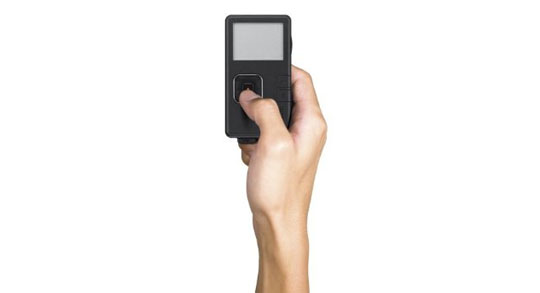
As you can see, the camera is very small, well-enough so that it can easily fit in your pocket staying true to the ‘pocket camera’ moniker. The layout of the camera’s controls is fairly standard and should not confuse anyone who has used a pocket camera. The 2” LCD screen is vibrant, capable of displaying up to 16 million colors and below this you will find the five-way control pad as well as play/pause and delete buttons. The five-way control pad allows you to turn volume up and down when reviewing a movie with the up and down directions (or controlling the digital zoom while in recording mode) and the left and right directions control video selection in playback mode. Speaking of playback: You can easily navigate and review the videos you have shot on the Vado HD thanks to its onboard screen and controls. Deleting videos is done by clicking the delete button once to initiate the deletion and a second time to confirm it. The center button starts and stops video recording. Along the sides of the Vado HD, you will find an HDMI output, audio output, power button, and lanyard loop.

Along the bottom of the Vado HD you will find one of its best features: a nested, flexible USB dongle. Some pocket cameras out there use a rigid pylon of a USB connector, but this is unstable and feels awkward when connecting to a PC. With the flexible dongle, it is very easy to attach and remove to your nearest hub or PC. And because it nests itself within the camera when not extended, it won’t get in your way while handling the camera.
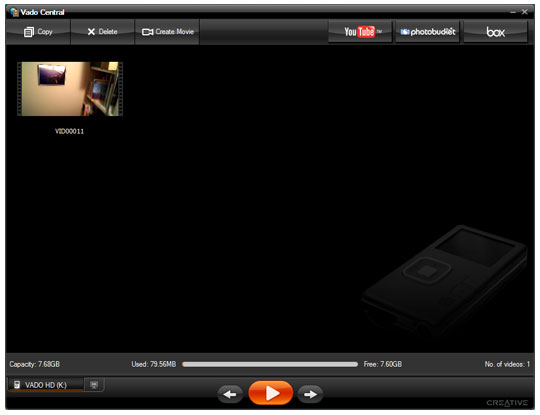
The software is a snap to install, and goes with the Vado HD wherever you take it as it lies in the internal memory of the camera. Plug the Vado HD in, hit the ‘okay’ button to run the Vado Central software and off you go. All of your videos stored on the camera will appear in a nifty UI for your perusal and uploading (it even allows a bit of video editing). Notice that on the upper-right corner of the UI you will see buttons labeled with popular video sites like YouTube. By clicking on one of them it will ask you for your account info and allow you to upload any of the videos from your camera in a couple easy steps. You can take a look at the UI in this next image, but know we have shrunken it down to fit the article window – it will be bigger on your desktop.
Creative even saw fit to include a silicon skin protective case, HDMI cable, and USB extension cable to help you connect to those hard-to-reach ports. The aforementioned HDMI output will allow you to send up to 1080i out to your television screen should it accept the cable type, of course.
Using the Vado HD in real-life situations is a breeze as well, as it features a tripod mount on the bottom of the camera to make it easy to use by yourself. Also, beginning to record a video is as easy as hitting the power button, waiting through the short boot up sequence, and then pressing the center button. This lack of complexity makes it a great choice for those moments when you need to record something right away. You get into a fender bender and need to record automobile damages? Whip that sucker out and start recording!
The 3x digital zoom, while not as good as an optical zoom, does a nice enough job thanks to the camera’s overall 720p resolution. There is really no pixelation worth mentioning in the process. Creative was smart in limiting the digital zoom to 3x, as many times when you start getting past that in cameras you notice all sorts of artifacting as the camera’s internal logic tries to compensate for the lack of image information.
Unfortunately, the Creative Vado HD does have a couple things I would like to see improved upon. The first thing is that there is no 3.5mm audio input jack. While the onboard microphone works for general usage, if I wanted to take the unit to a convention or some other noisy place, it would be nice to couple the great video quality with a more directed audio source such as an external microphone. If an audio input existed on the camera, the Vado HD could easily replace our standard HG-10 for use at such events. The second point of contention I have with the Vado HD is that there is no flash memory slot to expand the storage capacity past its internal 8GB. While you get about two hours of recording time with the internal memory, that can fill up fast if you don’t off-load it over the course of a day or two.

Aside from these issues, Creative’s Vado HD is the only pocket camera I would recommend at the time of this writing. The Flip Mino HD still has their clumsy, rigid USB pylon while also only allowing an hour of recording time. Meanwhile, the Kodak Zi6 has a larger form factor and is, IMHO, not as ‘sexy’ of a camera. For $229 dollars at Creative’s website, you can’t go wrong with their new Vado HD. Whether it be to record video podcasts, quick on-the-spot segments, or even industry happenings, the Vado HD is an excellent choice that gives you most of the full-fledged HD camcorder benefits in a much more economical package.
*Note to the reader:
We actually prepared a test video of the Vado HD for your viewing enjoyment, but realized that in the bright, Sunny Southern California scenery you probably would not be that impressed. We found a video in HD on YouTube, however, which showed some night driving around Japan that we thought was cool for you to take a look at. Check it out here, but we warn you that the filmmaker has added a strange soundtrack. So, click ‘Watch in HD’ on the page and turn down that audio to fully-enjoy the video quality of the Vado HD in night time conditions.




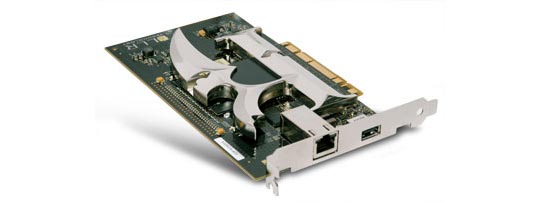
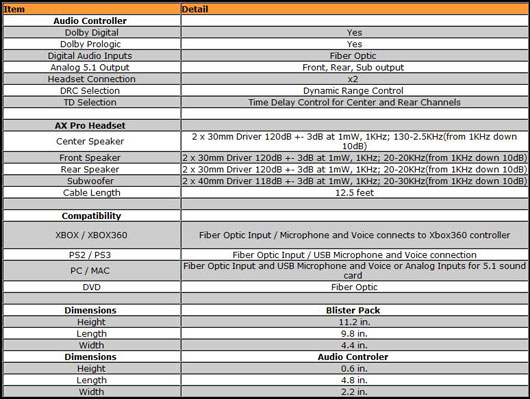
 Tritton has a fairly large line of gaming audio products. Their headsets in the past have generally been focused on one type of input. For instance, the Tritton AX PC is geared towards PC and Mac usage while the AX 360 is, as you can probably imagine, geared for use on the Microsoft Xbox 360 console. This AX Pro, however, is a new breed capable of utilizing multiple types of inputs while also including Dolby Digital and Dolby Prologic decoding for a true 5.1 channel experience.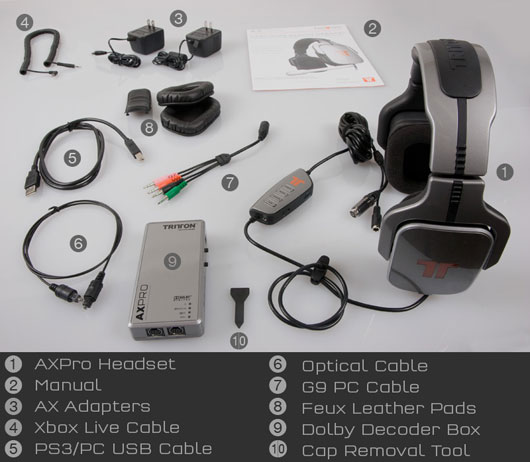

 Left 4 Dead by Valve Software – Valve really has a winner on their hands in Left 4 Dead. In plainest terms, it is a cooperative, first-person shooter set in the wake of a zombie apocalypse. These aren’t Romero zombies we are talking about here – these are Dawn of the Dead re-make zombies and the come at you in very large numbers. Left 4 Dead isn’t just about zombies though. In fact, because of the threat you and your three survivor buddies face, the game emphasizes teamwork above all else. One day, I would love to see company ‘retreats’ where their team-building exercises consist of Left 4 Dead rounds (I wanna work there!). Coupled with the fact that it is available via Valve’s Steam service, allowing it a built-in community, means you will not have to wait long to get game going. Aim for the head!
 Fallout 3 by Bethesda Softworks – If you never got the chance to experience the original Fallout or its first sequel, you are really missing out as they are truly some of the best RPGs ever made. Thankfully, this tradition has been carried on by Bethsoft even when taking the game into the first-person from the previous title’s overhead, isometric view. In Fallout 3 you will wander around a post-apocalyptic Washington D.C. in a quest to find your father, who mysteriously disappeared from the vault you have been living in since you were born. It features an incredibly immersive world replete with tongue-in-cheek humor and 1950’s retro styling. The game will take you many hours to get through, and even then you will not be able to experience everything, forcing you to play through it again and again.
 MMORPGs
 Spore: This species simulation had some serious hype surrounding it and, while unfortunate that it did not live up to all of it, what we did receive was a very creative life sim that allows you to take your small, multi-cellular beasties all the way from algae eating to space colonization. Suffering from a fair mid-point, the game’s first and last stages are more than worth the play-through. Plus, this is one of those family-friendly games that makes a great gift for the little ones you do not wish to see blowing away wastelanders with their Fat Man!
 Command and Conquer: Red Alert 3 by EA Montreal – While not the most advanced game when it comes to gameplay innovations or visuals, it is easily one of the most well-balanced RTS titles we have played in quite some time. This can lead to some very fun and highly-pitched battles between you and your friends (or enemies) in multi-player games. The single player campaign also stars the likes of Tim Curry, so get out there and defend Mother Russia for Dr. Frankenfurter!
 Out of the Park Baseball 9 by Out of the Park Developments – Unfortunately, aside from a racer or two, the PC market has not been very lucrative for sports gamers this year. Even though Out of the Park Baseball 9 is a baseball management game, it still tops our list as, well, nothing else was very notable. It features some of the most in-depth sports management ever seen in a PC game. Manage your players and team in both offline as well as online seasons against other players. Sorry sports fans, your future looks to be console-bound.
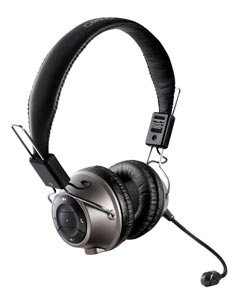 Creative’s HS-1200 Digital Wireless Headset: When we first looked at Creative’s wireless gaming headset we were skeptical at best. Usually, wireless headsets that cost less than a couple hundred dollars are lackluster. What we found, however, was that the HS-1200s featured incredible sound quality and a generally comfortable fit that made gaming (or just listening to music while relaxing) a joy. Plus, the boom microphone’s muting system makes it very easy to tell when your broadcasting, minimizing the risk of accidental outbursts to your friends playing with you.




 When we heard about this new HDD docking station from iStarUSA, we knew we had to try it out. Unfortunately, we have a ton of drives all over the place and their solution, especially since they billed it as hot-swap capable, sounded too good to be true. Thankfully, we have since then discovered that the xAge-N99SAU docking station is a welcome addition to our desktop despite a few limiting factors.
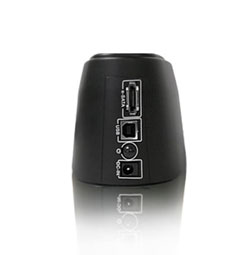
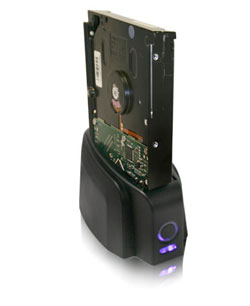 The biggest improvement over its slightly older brother, the N99US, is the addition of an eSATA connection. The front and sides of the docking station are clean, with no controls to speak of. There is an LED power indicator on the front, but its cool blue light is rather stylish. The ports and controls run down the back of the docking station. There you will find the AC power port, power button, and eSATA/USB ports.