Author - boothby

Apple Announces iPhone 4 at WWDC Keynote


Apple CEO Steve Jobs announced their iPhone 4 at the keynote speech of the WWDC, which is currently underway in San Francisco. The phone and accompanying OS, which will now be known as iOS 4, are all set for release later this month. Some of the more interesting aspects of this new phone are its internal gyroscope, which will allow for 6-degrees of freedom in gaming applications, as well as the ability to do video chatting. Unfortunately, this all comes to light after AT&T announces bandwidth caps on its data usage plans, which will hamper the user experience unless a compromise can be reached.

Read more about this new phone as well as when you can get it, After the Break!

With a 2 year contract, the iPhone 4 will retail for $199 in its 16GB incarnation, while the 32GB version will go for $299. Both phones will go on sale starting June 24th.

If you are a user of the iPhone 3G, 3GS, or new iPod Touch devices you will be able to upgrade to the new iOS4 for free starting on June 21st.

BlizzCon 2010 Tickets On Sale Tonight


*UPDATE: Looks like the first batch of tickets is now sold-out. Apparently, there is a second batch going on sale Saturday 6/5 at 10am, Pacific Time. Good luck!

Just a reminder to our readers, the first phase of 2010 BlizzCon tickets goes on sale tonight at 7pm, pacific time via the official Blizzard online store. Each ticket will retail for $150 and there is a five ticket limit purchase per customer. To expedite your purchase, have your Battle.net info all ready to go. Good luck, everyone!

Ticket Link:
BlizzCon Online Store

Kalypso Media Announces The First Templar

Kalypso Media has announced that Haemimont Games is developing a new third-person action game called ‘The First Templar’ for the Xbox 360 and PC platforms. The First Templar promises co-operative gameplay as two players take on a variety of 13-century opponents as a French Templar and a noble lady accused of heresy.

Features of The First Templar:
* Fast-paced cooperative play: players can assist one another as each takes on the role of the game’s key characters. Drop-in/out cooperative gameplay lets the AI take over when one player leaves the game
* Single player- two characters: Play as either character, switching roles as you go to use the best skills for the job.
* RPG inspired character development: each has their own skills and skill paths, which the player can develop as they complete missions and explore the game world
* Rich, historical game-world: return to the 13th century, where European culture is on the brink of collapse. 20 historically accurate locations have been recreated for the player to explore.

See the first screens of The First Templar, After the Break!

This Week’s Left 4 Dead 2 Mutation: Last Man on Earth

Valve has announced that a new mutation, called ‘Last Man on Earth’, will be available this week for owners of The Passing DLC pack. This new mutation will set individual gamers against hordes of ‘special infected’ without any AI or real companions. You truly are, the last man [or woman] on Earth. The announcement also encourages players to record their best 60-second clips of themselves playing the new mutation and upload them to YouTube.

Thrustmaster T-Freestyle NW Review

Peripheral makers have often attempted to re-create real-world equipment for use in video games. For example, flight simulation often yields high-tech sticks and throttle quadrants. The realm of skate and snow-boarding games has always been a slippery slope due to the difficulty in reproducing the balance of the actual activity. Thrustmaster has attempted just this with their T-Freestyle NW board for use on the Nintendo Wii Balance Board.

The T-Freestyle NW peripheral is made out of maple wood and actually looks like a real board – trust be told, I think it is a modded board. It is fairly weighty and feels very solid when being stood upon or moving it around. Thrustmaster has engineered a system of plastic stops on the board to prevent accidental falling while in use, which works most of the time. Too extreme of a movement can still lead to falling, so you have been forewarned. The board clips onto the Balance Board fairly easily, with to clamps on the fore and aft of the unit.

To test out the T-Freestyle NW, I chose to initially ride in my socks. Yeah – this was a bad idea as the board is slippery and you will undoubtedly find yourself on your backside in no time flat. If you insist on wearing only socks, please stick some grip tape to the board, that will help you quite a bit.

Several sessions of Skate It and Shaun White Snowboarding: Road Trip later, I can wholeheartedly recommend the T-Freestyle for your favorite ‘board titles. Whether skating or surfing, you will be glad you have the peripheral. It enhances realism while also giving you a wider foot base to stand on and won’t break your bank account to purchase.

The Thrustmaster T-Freestyle NW board for the Nintendo Wii retails $29.99 and is available now.

*DISCLOSURE: Thrustmaster provided us with a board for use in this review.

Gears of War 3 Gets Solid Release Date

Epic Games and Microsoft have announced that Gears of War 3 will be released on April 5th, 2011 in North America, April 7th in Japan, and April 8th in Europe. This news comes a day after ‘Cliffy B’ unofficially announced the game and screened its debut trailer on Late Night with Jimmy Fallon.

Skate 3 Demo Releases on April 15th

Electronic Arts announced today that the demo for their upcoming Skate 3 would touch down on both the Xbox LIVE Marketplace and PlayStation Network on April 15th. Skate 3, the full product, will be released on May 11th.

Review of the Killer XENO Pro NIC from Bigfoot Networks

A little over a year ago, we reviewed Bigfoot Networks Killer M1 network interface card, giving it some high marks for the performance gain in many of our favorite online/multiplayer games. However, one thing that always bothered us about the unit was that it’s high price point did not really necessitate purchasing it when, for just a few dollars more, you could pick up a new CPU instead. Bigfoot Networks has learned from their experiences with the previous products and recently released the Xeno line of network interface cards. In this review, we will focus on their Xeno Pro NIC.

DESIGN
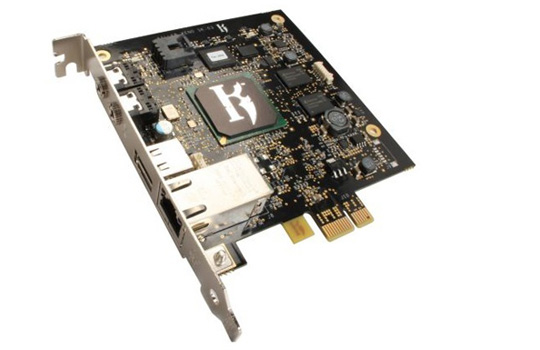
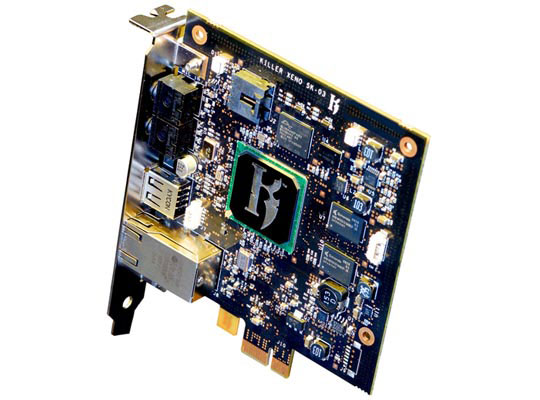
Unlike the Killer M1, the Xeno utilizes a PCI-E interface, making it able to be a lot smaller than the previous unit. Gone is the blade-like heatsink, replaced by the Killer emblem on the NPU (Network Processing Unit). The card measures 4′ x 4.5′ x .75′ and weighs only 4 oz. The back of the Xeno Pro features not only a LAN cable port, but also a USB 2.0 port, 3.5mm headphone jack and 3.5mm microphone jack.

OFFICAL SPECS
* Speeds: 10/100/1000 Mbps
* 400 MHz dedicated Network Processing Unit
* 128 MB DDR PC2100 266 MHz memory
* PCI Express x1 Connector
* Ports: RJ-45, USB 2.0, 3.5mm audio input and output
* Dimensions: 4′ x 4.5′ x .75′ (10 cm x 11.5 cm x 2 cm)
* Weight: 4 oz (115 g).
INSTALLATION
Installing the card into an available PCI-E slot is relatively simple provided you have done such an operation before. Your PC case may have a proprietary locking system on the card bays, so be sure to check your case manual for how to insert new cards into the motherboard. For those of you with experience, you will have the card physically in the mobo in a minute or two. From there, just plug in the cables to the back of the unit and turn on the PC. Once on, you insert the included software disc and install the Xeno Pro software/drivers.

SOFTWARE
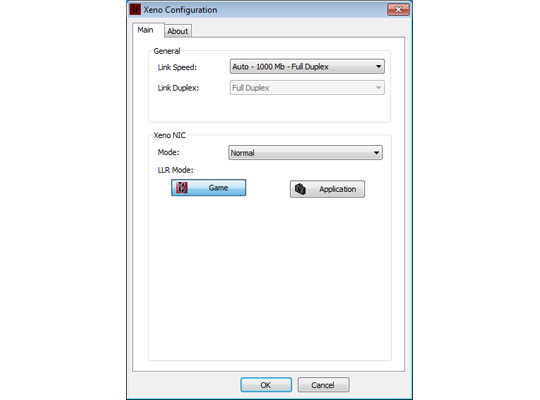
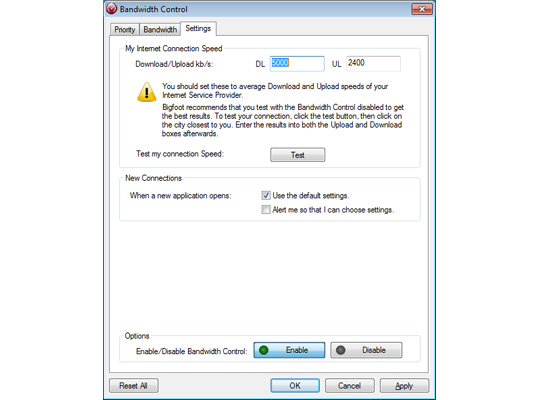
The basic Xeno Pro software package is very similar to the one that shipped with the Killer M1 NIC, featuring an straightforward layout with the controls to prioritize various applications and games in the network stack, as well as simply turning the card from ‘Application’ to ‘Game’ mode, in case you just want to keep things generally-simple. There is not a lot of help though when using the software, though, which would make things a lot easier for less-experienced users. One such feature is the ‘My Internet Connection Speec’ setting in the Bandwidth Control app. Unless directed, you could completely miss setting the average upload and download speeds of your connection. The software uses these figures in its calculations and, if not set properly, you could actually hinder your connection!

An optional piece of software that I cannot, as a Xeno Pro user, recommend downloading enough is the ‘Dashboard’ software, which features an array of very useful network monitoring tools. It easily allows you to monitor UDP Offload, Ping, CPU Load, and graphical Frames Per Second. This makes benchmarking the card a heck of a lot easier for everyone, and the results will be readily available when you need them – especially the UDP Offload. There is actually no way to test for UDP Offload without a third-party as UDP packets require no ACK packets sent in return with which to measure. When running the Dashboard software, it utilizes Bigfoot Networks servers to calculate your estimated offload.
TESTING
For our testing, we chose four different games: World of Warcraft, Team Fortress 2, and Call of Duty: Modern Warfare 2. The Bigfoot Networks Dashboard software was used for benchmarking purposes, although we cross-referenced the FPS ratings with ones taken in FRAPS as well for verification. Each test was done in three iterations both with and without the Xeno Pro, over a period of five minutes each.

OUR TEST RIG
CPU: Intel i7 2.66GHz
GPU: Nvidia GTX-280
RAM: 6GB DDR3 1600
Motherboard: EVGA X-55 Classified
HDD: Western Digital Caviar Black 1TB 7200RPM
OS: Windows 7 Ultimate 64-Bit

GAMING RESULTS
World of Warcraft
– Avg Ping (Killer/Internal): 170.88 ms / 172.58 ms
– Avg FPS (Killer/Internal): 59 / 61

Team Fortress 2
– Avg Ping (Killer/Internal): 45.33 ms / 67.62 ms
– Avg FPS (Killer/Internal): 118 / 112

Call of Duty: Modern Warfare 2
– Avg Ping (Killer/Internal): 84.33 ms / 92.11 ms
– Avg FPS (Killer/Internal): 43 / 40

MISC. ONBOARD FEATURES
It is worth noting that Bigfoot Networks allows users to take advantage of the fact that they basically have a whole separate computer system on the PCI-E card to actually run applications on it. This adds an additional level of benefit to owning one of the cards, as it can run specialized versions of applications like TeamSpeak and Skype without affecting your main system’s performance.

Also important to note is that the Killer Xeno Pro features a full-fledged firewall solution, which has the benefits of a software firewall in terms of flexibility, but also backed up by the hardware of the card itself – a ‘best of both worlds’ solution, if you will.
FINAL THOUGHTS
While our results show that the Bigfoot Networks Killer Xeno Pro NIC does improve UDP performance, we are left wondering if gamers will shell out the extra cash to buy the card on its own when most motherboards these days already come standard with internal network cards. Thankfully, three things should help gamers decide in Bigfoot Networks’ favor – the fact that they have joined forces with system-builders such as Alienware, Dell, and iBuyPower to allow the card to be installed at the time of system configuration/purchase; Also, the card recently fell in price by roughly $30 dollars. Its new $99 dollar price point means that it is finally reasonable enough for gamers to want to pick up, even on its own through EVGA and VisionTek; And, finally, you get the a really nice firewall on the card to boot. The Killer XENO Pro is a good way to squeeze a bit more performance out of your PC without having to purchase a brand-new GPU or CPU.


Review of the Avid Pinnacle Dazzle Video Creator Plus HD

Avid’s newly-acquired brand, Pinnacle Systems, Inc. is a long-time creator of consumer video editing peripherals. The latest in their Video Creator peripheral series is the Video Creator Plus HD, which promises to allow consumers the ability to shoot and edit video on their PCs.

INSTALLATION and SETUP
The first step in getting the Video Creator Plus HD system to work properly is to install the included software disk. Not only will the disk install the Pinnacle Studio HD software suite, but also the drivers for the key hardware component of the system – the DVC-107 USB video capture dongle. Pinnacle has made the installation very easy, thankfully, and after you get done with the install software, you can plug the DVC-107 into an available USB 2.0 port and let the magic begin.

DESIGN
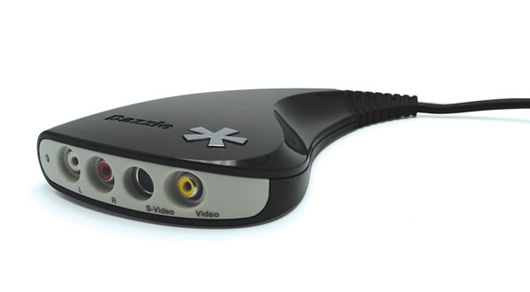
The DVC-107 video capture dongle features an all-white or all-black, slick plastic shell with plastic-insulated cabling that ends in a USB 2.0 plug. The DVC-107 features ports to accept both RCA as well as S-Video inputs as well as RCA (stereo) audio inputs. The peripheral is powered all by the USB connection, so there is no added RF adapter to worry about toting around. Thankfully, this makes the video capture dongle extremely easy to take with you in your jump bag. The design is pleasing to the eye as well, which makes it nothing you would be ashamed to have connected to your laptop while you edit video.

USAGE
Using the Video Creator Plus HD is very easy, allowing you to get video from any source which uses the accepted cabling. For instance, you can transfer over video from your VHS cassette players to digitize your old home movies. For the would-be filmmakers out there, getting video from your camcorder is equally easy, and the system takes the technical load off of you so that you can focus on actually editing your video.

You can also use the DVC-107 dongle, once fully-installed, as a means of getting live video from your USB port-equipped camcorders for use in streaming video services like USTREAM. This unadvertised feature makes the Video Creator Plus HD a great solution to bridge the divide between those of us with FireWire-equipped camcorders and those of us without.

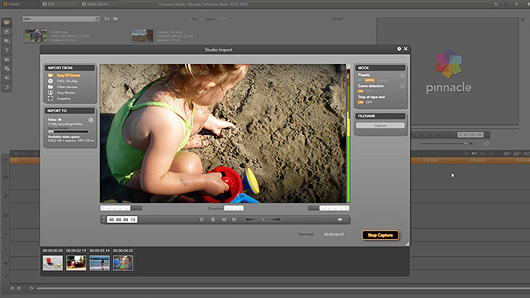
The included software is very east to use, and I am not just writing that from someone who is used to software like Sony’s Vegas and Adobe’s Premiere software. Even laypersons should have no problem picking up the in’s and out’s of the Pinnacle Studios HD software. Once completed, you can then output your video back through the DVC-107 dongle or even to online services like YouTube. The software features track-based audio and video editing, a titler, as well as transition effects. Without taking a scientific study, I would guess that this is the most inexpensive, full-featured video editing software available.

OVERALL
Avid’s Pinnacle Dazzle Video Creator Plus HD works exactly as advertised and then some, being a very easy way to get video from your camcorder, or VHS tape player, to your PC. Additionally, it then allows you to edit the video in the included software suite, adding transitions, effects, etc. For $89.99 on the official website, you just can’t find a better price to value solution that will do what this system can.

*DISCLOSURE: Pinnacle Systems gave GamingShogun.com a Video Creator Plus HD for the purposes of this review.