
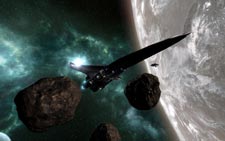
 The ‘X’ series of space sims have always been known for their open-universe gameplay and freedom of choice. X3: Terran Conflict upholds this tradition along with bringing the story began ten years ago, in X: Beyond the Frontier, to a close.
For newcomers, you should expect to scratch your heads for many hours while attempting to suss out what to do next. Don’t fear, this is a perfectly normal effect of jumping into an ‘X’ game. The effect will pass in time as you realize that the whole universe is your oyster. You can do just about anything you like within the realm of the game, whether it is to work as a trader, mercenary, or pirate (and a whole lot more). You can even build up a fleet of your own to perform duties while you are away. The game even allows you to build your own business empire by owning factories, stations, etc. The depth in X3: Terran Conflict is so vast, I doubt anyone could do everything the game has to offer. So explore why don’t you!?! Just remember to save often.
For you veterans to the series that have played X3: Reunion, feel happy, as you are in for a treat. Egosoft has enhanced Terran Conflict from its recent predecessor in many fruitful ways. For instance, graphically, the game looks even better than Reunion (and that is saying something). Space is so vast, the word ‘vast’ really can’t do it justice.  This feeling of hugeality (my word) is properly infused within the game. No matter how powerful you become, how rich, or how many ships you acquire, you are still just one person in a very humbling universe. Your starship’s user interface, while still full of complex options, has been refined as has controlling your space craft with your mouse (although I highly recommend a flight stick for the ‘full effect’). Navigating the menus is easily done, but make sure you are out of harms way before exploring them, it would be a shame for some pirates to get the drop on you! Based on the new features, it is quite clear that Egosoft has listened to the fans and has brought out a very complete product.
One thing that has bugged me since X3: Reunion, however, is the lack of a cockpit view. In the original X: Beyond the Frontier, your viewpoint was from within a 3d cockpit view as was it in X2: The Threat. In the third game of the series, Egosoft removed the cockpit and provided a view more reminiscent of Freespace 2 (one of the greatest space-combat games of all time, btw). This is, obviously, more a personal preference and I just like to see the ship around me. In its defense, the view does work well and gives you more of an unobstructed view than a cockpit would.
Combat still feels realistic (well, as realistic as I think space-combat should be), even without true Newtonian movement. You can purchase and equip a variety of weapons, from energy-based blasters to torpedoes and cannons. Same goes for ship/station components: there is just a gigantic variety of everything for everything. This hearkens back to the game’s magnificent scope and continues to show their desire to create a truly immersive universe for the player to exist within.
 In our interview with Egosoft Founder Bernd Lehahn, he mentioned that his biggest regret with the ‘X’ series was that they were forced to release X3: Reunion early, and in a more unpolished state than he would have liked it to be in. I can safely say that X3: Terran Conflict has not suffered such a fate and will be enjoyable by long-time fans of the series as well as fans of games such as Independence War, Privateer, and Starlancer. X3: Terran Conflict has something in it for everyone. Unfortunately, big-production space sims are few and far between these days and it is very important to support quality work like this.
Confused about our rating system? See here, citizen!



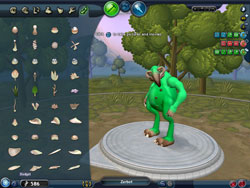
 The camera follows it down to its ocean impact with a quick camera zoom in to reveal your species emerging from the rock. You don’t look like much at this point, basically a small cellular blob with a flagella, pair of eyes, and a mouth part (you select to be a carnivore or herbivore). Your goal is simple: swim through the waters, eating as much as possible in order to advance to the next level of the stage. This stage is similar in concept to flOw, albeit with much more fleshed-out graphics. Each of these levels in the cell stage increases your creature in size that is accompanied by a very cool ‘zooming-out’ effect by the camera. Blurry (yet seemingly Death Star-sized) creatures and objects that appeared in the background will now be revealed as your size, and even bigger things appear in the background. This in-game commentary on ‘there is always a bigger fish’ is a very cool element to the stage and really gives you the feeling your little organism is growing. In addition to size, you increase in available DNA points with every level increment. This is where the creature editor comes into play. As you collect DNA from either plants or animal life, you will eventually unlock the ability to equip different kinds of defensive and offensive parts to your body. Each of these pieces costs a different amount of DNA from your total pool.
 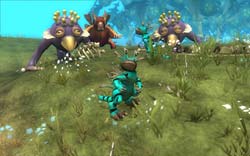 Creatures are SO CUSTOMIZABLE it is not anywhere near funny. Objects can be placed just about anywhere and all have their own adjustments as well. With so much variation at your fingertips, it is easy to lose yourself in it for hours just experimenting with different configurations.
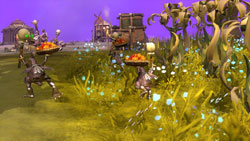 For you herbivores out there, focus on the peaceful, diplomatic body parts then charm the pants off of those other species!
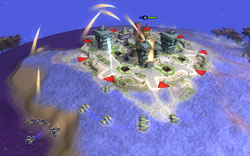 You will create land, air, and sea vessels which like the creature editor you can get lost in for quite some time. Unfortunately, you can only design one kind of each of these vehicles for the three categories (military, religious, economic). The civilization stage is not fleshed-out enough as far as its real-time strategy elements are concerned to be anything more than a buffer between two otherwise fun stages. In opposition, I could accept the simplistic gameplay of the tribal stage because your people ARE primitives at that point. Also, you no longer get the warm and fuzzies by controlling your individual creature anymore so you have nothing to empathize with.
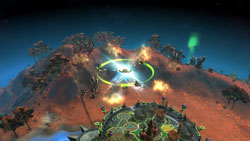 You ‘pilot’ the ship from planet to planet, performing various missions such as seeding, destroying, and scanning. This brings back the intimacy of the creature stage while also allowing you to construct some very sweet-looking space ships. Some people I know have gone so far as construction their own X-Wings in the game. Not very original, I know, but it does show off the flexibility of the editor.
 And when they are scared and shrieking while you devour them, it makes you feel a little bad. I still have nightmares…

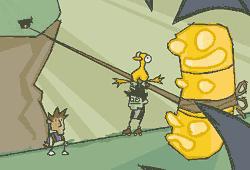 Dan Marshall and Ben Ward are the masterminds behind Zombie Cow Studios, and their first project is a point-and-click adventure game aptly titled ‘Ben There, Dan That’.
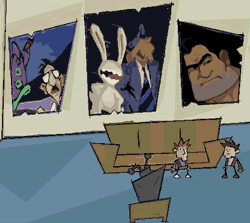 Well, it is not really Dan’s head per se, but a virtual representation of the virtual representation of Dan’s head.This last tool is the most unique, as this is how you get Dan to do ‘stuff’ and is vital in overcoming your journey’s challenges. For example, if you need to throw a switch on one side of the room while doing something else on the other side, you could have Dan throw said switch while Ben works elsewhere. This tag-team aspect of the game is a very clever gameplay element, and the banter between the two characters is very witty.
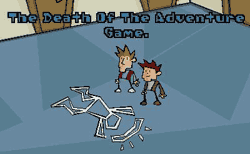 Ben and Dan also makes a clever commentary on the current state of adventure games (See right). It is rare that an independent developer can make such an inspired, witty, and entertaining game such as Ben there, Dan That. It goes to show, just as the classic adventures that came before it did, that you do not need fancy 3d graphics to entertain, and that message is a welcome site in the age of the multi-million dollar video game. Zombie Cow Studios, we salute you! Did we mention the game is free to download?
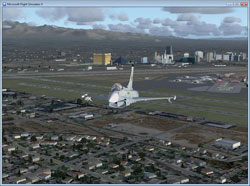 X1 Software’s Eurofighter 2000 for FSX and FS9 adds the titular aircraft (actually a few variations) to the two most recent versions of Microsoft’s Flight Simulators. We played it out on Microsoft’s latest offering, Flight Simulator X. After installing the add-on, we read through the instructions. There are optimum realism slider settings to achieve the proper flight modeling, so be sure to follow the instructions carefully. Also a good read through is the cockpit guide, but more on that later.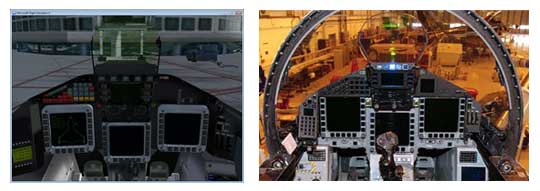
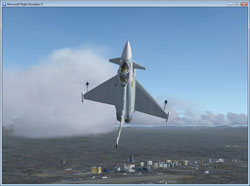 This inertial effect was quite cool and, even though I do not know how the real aircraft handles, it ‘felt’ realistic.