
We have all been there. You spent three hours setting up your camera. The lighting is pristine. You look like a million bucks. Then, you sit down in your editing chair, pull up the audio, and want to cry. Your voice sounds flat, thin, and buried under a layer of background static. Honestly, nothing kills a great stream or video faster than garbage sound.
Most camera setups require a massive, annoying pile of gear. You have to plug in bulky adapters, run heavy cables, and mount giant receivers to your rig. It is a massive pain for streamers who want to move around their setup, or gamers trying to show off active VR gameplay.
GoPro wants to fix this with their new GoPro Wireless Mic Complete Kit (Model AWMIC-010). At $159.99, it is a seriously aggressive move. They are throwing a dual-channel system directly at giants like DJI and Rode for nearly half the price. But does it actually hold up when you are running, gunning, or screaming at your monitor? Let’s check it out.
Light as a Feather
First, let’s talk about the actual hardware. Most clip-on mics feel like hanging a heavy plastic brick from your collar. If you wear a lightweight t-shirt, the mic sags and points straight down at the floor, which completely ruins the sound.
Here’s the thing: GoPro’s transmitters are ridiculously small. Each one weighs a measly ten grams. That is basically the weight of a couple of coins. By comparison, a DJI Mic 2 transmitter is a chunky twenty-eight grams. You can clip the GoPro mic on and literally forget it is there.
It also comes with high-strength mounting magnets. You can slide the magnet inside your shirt and stick the mic on the outside for a super clean, invisible look on camera. Honestly, it is a brilliant design for active sports, fitness streams, or just looking clean on a Twitch broadcast.
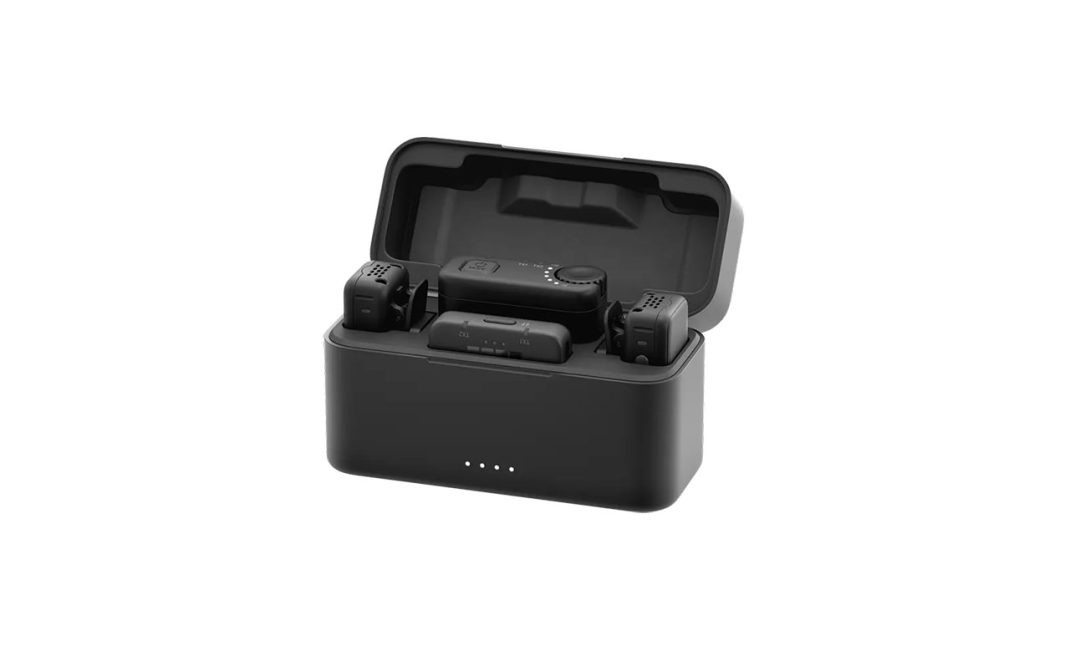
The charging case is a neat little box that extends your battery life up to twenty hours. Inside, it houses a 1500 mAh battery that can juice up your transmitters and TRS receiver twice. But the designers made a silly mistake: you cannot fit the transmitters inside the case while the furry windmuffs are attached. You have to rip them off every single time you put them away. Plus, there is no slot to store your cords. You will need to toss them in a separate pouch and hope you don’t lose them on your way to a shoot.
How the Wireless Link Works
Now, how does it actually send your voice to the camera? This is where things get interesting. The system uses two completely different wireless modes depending on your setup.
If you plug the physical USB-C or TRS receiver into your gear, it runs on a standard 2.4 GHz digital band. In this mode, you get uncompressed, high-fidelity twenty-four-bit audio at forty-eight kilohertz. It sounds incredibly rich, and the wireless range stretches up to nearly five hundred feet.
But what if you hate extra cables? Let me explain a genius feature. If you have a newer camera like the HERO13 Black, the MAX2, or the Mission 1 Pro series, you can connect the transmitters directly via Bluetooth with no receiver plugged in at all.
Normally, connecting a microphone via Bluetooth sounds awful. It is usually locked to the old HFP 1.7 standard, which chops off all your high frequencies and makes you sound like you are calling from a payphone. GoPro bypassed this by using Bluetooth profile 1.9 with Super Wideband Speech. This boosts the audio to sixteen-bit and thirty-two kilohertz.
Honestly, the difference is massive. Your voice comes through warm and clear, with plenty of detail. It sounds like you are sitting in a cozy radio booth rather than screaming into a tin can on a string.
There is a quick catch, though. If you pair directly via Bluetooth, you can only connect one microphone at a time. If you are doing a two-person interview or a co-op stream, you must plug the receiver in to run both transmitters simultaneously.
Safety Tracks and Noise Limits
Let’s talk sound quality. The capsule is omnidirectional, meaning it picks up sound evenly from all sides. It does a stellar job of capturing a natural vocal tone. The self-noise sits at twenty-six decibels, which is slightly louder than the DJI Mic 2’s twenty-one decibels, but in normal rooms, you will never notice the difference.
To handle tricky spaces, GoPro packed in two neat tricks. First, you get Dynamic Noise Reduction. It does a fantastic job of slicing through background hums like hum from a PC fan or wind.
Second, you get a Safety Track mode when using the receiver. It records a second track at six decibels lower. If you suddenly scream after losing a match, the backup track saves your audio from horrible digital clipping.
But here is a slight contradiction. GoPro built a great safety track, but they completely left out local onboard recording. Premium setups from DJI or Rode let you record uncompressed backups directly to the transmitter’s internal memory. If your wireless signal drops in a congested area, the GoPro system cannot save you, and that audio is gone forever.
The Fine Print
As great as this kit is, it has some annoying real-world quirks. First, let’s look at the pairing process. The official printed manual tells you to double-press the power button to switch the transmitter into Bluetooth mode.
Guess what? The manual is wrong.
It actually requires a rapid triple-press. If you keep trying to double-press, the light stays flashing green, and your camera will never find it. Then there is the editing headache. If you use the USB-C receiver to record two people, you might panic when you look at your camera’s screen. The meters might only show one microphone moving. Don’t worry, both are recording. The system splits them into a single stereo track, placing one person on the left and the other on the right.
When you pull this into editing software like Final Cut Pro, it imports as a single stereo container. This means one person only plays in the left headphone ear, and the other plays in the right. It sounds bizarre.
The quick fix is to change your clip configuration from “2 Stereo” to “4 Mono”. Suddenly, you get independent, centered tracks for each person, plus the camera’s ambient mics on separate channels.
And a heads-up for legacy users: if you try to use the TRS receiver with older models like the HERO10 Black through the analog Media Mod, prepare for bugs. Swapping video settings or resolutions can cause the camera to silently disable the external mic, reverting to its internal microphones. You’ll need to reboot the whole setup to get your audio back.
The Final Score
Honestly, despite the quirks, GoPro has built a highly impressive system here. For ninety-five percent of creators, gamers, and streamers, the GoPro Wireless Mic Complete Kit is a fantastic deal. You get clean, broadcast-usable audio, direct receiver-free pairing, and a feathery design that won’t ruin your shirt. If you can live with the manual’s pairing error and the minor case issues, it is a massive upgrade over built-in audio.
Overall Rating 4 out of 5 stars
Pros
- Extremely lightweight ten-gram design
- Excellent direct-to-camera Bluetooth audio
- Fantastic Dynamic Noise Reduction
- Half the price of DJI
- Great magnetic mounting option
Cons
- No standalone onboard recording
- Bluetooth supports one mic only
- Furry windmuffs block charging case