Star Wars. The name conjures up images of epic space battles, mystical energies, the battle between good and evil, and even the conflicts that rage between children and their parents. A bit about me: I was less than pleased with the latest trilogy of movies and just displeased as possible with the CGI Clone Wars film. I did, however, love the animated Clone Wars series and, of course, the original trilogy (Han shoots first dammit).
So you can imagine my apprehension when sitting down to play Star Wars: The Force Unleashed.  Oh sure, the preview stuff had looked interesting and sometimes blew me away (the Emotion demo vids for instance) but you can’t always tell when it comes to a Star Wars these days. How are we to trust Lucasfilm, LucasArts, Lucas* when we, as fans, have received such a spotty track record of both awesomeness and lameness? Anyhow, so I start the game and the main theme kicks off with the Star Wars logo. It slowly moves into the cosmos and the title crawl begins. I am already hooked. Why is it that just this alone is enough to fire my geek engine like nothing else? So at this point I am very excited to get past the opening crawl but remember Master Yoda’s teachings and utilize some of this mystical mojo we call ‘patience’ to see it through.
And then LucasArts might as well have shot me with a dart of pure adrenaline because you start the game playing as ‘the man’, Darth Vader himself. And, it does not disappoint. Without spoiling it for you guys, the situation in which you find yourself in and what you must do during the first level are the things of geek legend. I kid you not.
Enter ‘Starkiller’, a young boy who Vader finds and takes as his own apprentice, we assume raising him (how much of an extent is not really seen) as well as Vader could given his busy schedule of slaughtering Jedi and being the errand boy for Emperor Palpatine.  Now, it finally dawned on me where I had seen this character’s face before. I am sitting there and I blurt out, ‘Hey, Starkiller was on BSG!’, much to the funny looks from my two cohorts beside me. You see, Sam Witwer, who played ‘Crashdown’ on the re-imagined Battlestar Galactica series is Vader’s young apprentice. He not only voices the character but also lends his face to the game. They have modeled it extremely well and, unlike Kristen Bell in Assassin’s Creed, is very recognizable even without a lab ID card on his bosom. Not only that, but Witwer puts in a great performance and is a total credit to this game.
Vader is voiced by none other than Chad Vader’s Matt Sloan (who voices Vader in that series of shorts too). This guy is incredible, the BEST Vader in a video game or movie since James Earl Jones. I did not hear one line uttered from him that did not sound spot-on. If the guys at LucasFilm and LucasArts were smart, they would hire him from now own as Vader’s voice in any future film or video game. It is scary how good he is.
 The aforementioned actors as well as the rest of the cast all put it incredible performances and I can’t think of anyone who came off as ‘wooden’ or unbelievable. The rendering of the cutscenes is equally incredible and makes me wish LucasFilm would have focused on turning this into a CGI film instead of the Clone Wars. And guess what? There is not a single fart joke in this entire beast, imagine that!
The gameplay in SW:TFU is done in the third-person ala God of War or Viking: Battle for Asgard, and is far more action-oriented than what you might have played in the demo. In the actual game, you will find yourself using your lightsabre a ton more as force grip requires you to stand perfectly still while controlling an object and, if you get hit, you lose that control. It is just not combat viable in hordes of enemies. Now, force lighting, THAT is an ability (especially when maxed out)! That’s right, as you progress through the game, you will gain points with which to customize your character – learning new force abilities and attack moves. The boss battles can be fun, however the game’s finishing system used to dispatch most is a bit awkward. Unlike God of War’s finishing system, this does not feel fluid or timed like you would expect, causing many missed attempts in the process.
Unfortunately, the camera can be down right awful at times, especially when in narrow passages or caverns. This is not only an issue in confined spaces, but the cinematic camera used when you fight Jedi is, again, awkward. They have tried to make it feel like you are watching a duel from one of the films, but it ends up just making everything difficult to see.  The camera will zoom out from behind you and move to some angle to try and frame the entire room in which you are fighting. Problem is, that when zoomed out, it is easy to lose your character (or the enemy’s) when the objects really start getting knocked about. Additionally, targeting between anything becomes more difficult as your perspective is off from your character’s (on which targeting is based). Aside from the camera, levels seem to spottily move from easy to insane in terms of difficulty level. While an increasing scale of difficulty is to be expected in most games, these seemingly random patches of insanity definitely keep you on your toes.
Overall, I cannot recommend Star Wars: The Force Unleashed enough. The game provides a much needed does of quality Star Wars story and excitement. The gameplay is not perfect, as I have stated with regards to the camera and whatnot, but these imperfections are a small price to pay for the wealth of goodness that otherwise lies within the title. Star Wars: The Force Unleashed…Do it, you know you want to!
Confused about our review system? Click here.



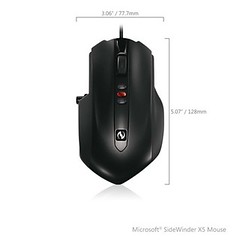 The X5 features a hard, black plastic design, save for the cap pieces which are rubberized, with a rubber scroll wheel and plastic vertical side buttons. The high-gloss, plastic center strip houses the scroll wheel, DPI, and Quick Turn buttons. Not a flashy gaming mouse, the X5 is only equipped with two rear-mounted undercarriage lights. Its minimalistic aesthetic gives an air of dignity to the mouse in a category where gamers often pay more for flash than function. Thankfully, the X5 makes up for its lack of lighting effects with a variable-DPI laser sensor.
 Gone are the adjustable weights and interchangeable feet of the original Sidewinder, but they are not missed here in the least. The X5 shows that you do not need those frills in order to be effective in-game.
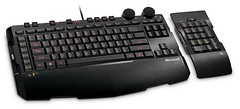 The keys are a hard plastic that do not feel like they belong. Thankfully, their action is nice with a good spring-back. If I had to suggest another feature on the next version of this keyboard, it would be to add a USB and audio port pass-through, something that is featured on many other keyboards in this price range.
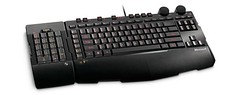 You press this button, located along the top of the keyboard and then press the series of keys (up to four) you want it to remember. Finally, there is the keyboard’s ‘Cruise Control’ functionality, where you hold down the cruise control button and press a single key you wish to spam to your PC. Then release the cruise control button and it will go to work sending that key signal as if you were holding it down. Say you would like to auto-run in a shooter which does not feature such a key. Simply press the cruise control down, tap ‘w’ and release. Your character will continue running forward until you press any other key.
 The camera follows it down to its ocean impact with a quick camera zoom in to reveal your species emerging from the rock. You don’t look like much at this point, basically a small cellular blob with a flagella, pair of eyes, and a mouth part (you select to be a carnivore or herbivore). Your goal is simple: swim through the waters, eating as much as possible in order to advance to the next level of the stage. This stage is similar in concept to flOw, albeit with much more fleshed-out graphics. Each of these levels in the cell stage increases your creature in size that is accompanied by a very cool ‘zooming-out’ effect by the camera. Blurry (yet seemingly Death Star-sized) creatures and objects that appeared in the background will now be revealed as your size, and even bigger things appear in the background. This in-game commentary on ‘there is always a bigger fish’ is a very cool element to the stage and really gives you the feeling your little organism is growing. In addition to size, you increase in available DNA points with every level increment. This is where the creature editor comes into play. As you collect DNA from either plants or animal life, you will eventually unlock the ability to equip different kinds of defensive and offensive parts to your body. Each of these pieces costs a different amount of DNA from your total pool.
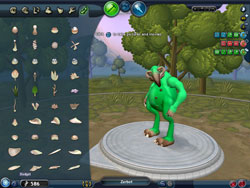
 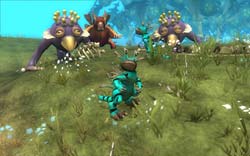 Creatures are SO CUSTOMIZABLE it is not anywhere near funny. Objects can be placed just about anywhere and all have their own adjustments as well. With so much variation at your fingertips, it is easy to lose yourself in it for hours just experimenting with different configurations.
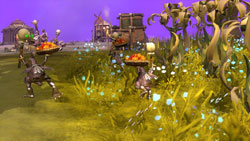 For you herbivores out there, focus on the peaceful, diplomatic body parts then charm the pants off of those other species!
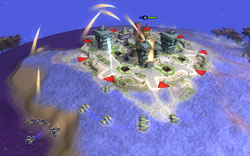 You will create land, air, and sea vessels which like the creature editor you can get lost in for quite some time. Unfortunately, you can only design one kind of each of these vehicles for the three categories (military, religious, economic). The civilization stage is not fleshed-out enough as far as its real-time strategy elements are concerned to be anything more than a buffer between two otherwise fun stages. In opposition, I could accept the simplistic gameplay of the tribal stage because your people ARE primitives at that point. Also, you no longer get the warm and fuzzies by controlling your individual creature anymore so you have nothing to empathize with.
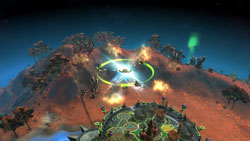 You ‘pilot’ the ship from planet to planet, performing various missions such as seeding, destroying, and scanning. This brings back the intimacy of the creature stage while also allowing you to construct some very sweet-looking space ships. Some people I know have gone so far as construction their own X-Wings in the game. Not very original, I know, but it does show off the flexibility of the editor.
 And when they are scared and shrieking while you devour them, it makes you feel a little bad. I still have nightmares…



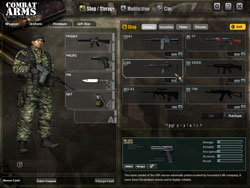
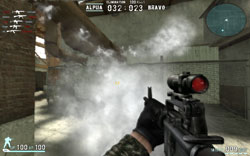 The goodies in question are a huge number of weapons, items, and modifications all based on their real-world counterparts. You purchase these items with points garnered from successfully winning games and killing your enemies. Purchasing something from the shop, you are given a choice as to how long you wish to keep the item (it costs more for the longer duration selected). This system of transactions (which will eventually include real-world money transactions) is in the UTMOST state of beta at the moment and is highly subject to change. There is also a chance that Nexon will offer several subscription models as well, but file that in the ‘rumor’ folder for now. As told to me from a company representative, development is firmly set in the realm of making the game as good as possible before they worry about the monetary system.
 Combat Arms was the ability for your side to function as a cohesive team instead of getting myred down by complex gameplay mechanics. The gameplay is actually fairly simplistic, much like Dynamix’ Tribes was (and people STILL play that one). However this simplistic design ends up allowing a huge amount of complexity in how squads/guilds/clans will organize themselves and their plans to dominate the multiplayer games. Of course, there are always players who just want to run-and-gun, and that is fine for them. You will get a lot more out of the Combat Arms experience from getting involved in one of these squads.
 The graphics in Combat Arms are pleasing, yet not too high-end. These graphics (and in fact the whole game) are made all the more impressive once you realize it is a relatively small client to download and free to play. Quality like this is usually found in retail boxes.