Open-air cases are the latest thing in PC gaming enclosures. For years, many gamers chose to run their PCs with the side doors open and large external floor fans pointed at the components. While this solution provided good airflow, the components are still all mashed into a vertical ATX PC case. Plus, you would have to worry about keeping enough space around the case to place the floor fan.
Antec has attempted to fix these frustrating issues with their first open-air case, the Skeleton. Looking like some sort of futuristic reactor more than PC case, the Skeleton features room for four internal drive bays as well as four additional drives along its side. The motherboard is seated horizontally on the upper-tier motherboard rack, which slides out the back of the unit like your friendly neighborhood server slides out of a rack mount, making reaching around different places of the motherboard easy. There is an issue with fan overhead however, and we found that tall aftermarket CPU coolers will not make the clearance given by the large 250mm unit. What this means is that you will have to use a shorter third-party cooler or the stock unit.
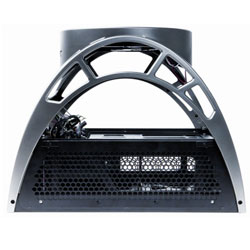
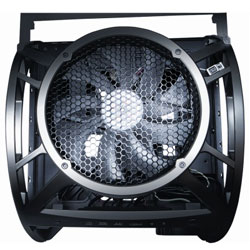 The room is not nearly as plentiful in the below-mobo area where the PSU and internal drives are located, with snaking cabling about becoming a real pain at times. In addition, the way the PSU faces to one side takes away from valuable cable length when pulling cables to the opposite end of the case. These bottom-tier space issues aside, the ease of getting to your mobo components makes it well worth the trouble to be found underneath. Need to add a video card? Simply slide the component tray out the back of the unit and slap it in there, all easy like!
The Skeleton comes equipped with two fan units. The most prominent being the 250mm Tri-Cool fan at the top of the unit. It draws cool air in and pushes it down onto the components below. Also included is a smaller 92mm fan which attaches to the front of the internal 3.5′ drive bay, providing hard drive cooling. It is important to keep the air moving underneath the motherboard as it acts as a barrier from the forced air coming from the 250mm fan above. By circulating the air underneath, this problem is alleviated.
Installing everything was actually fairly difficult. Not because the process itself is overly hard, but deprogramming myself after years of vertical ATX case installing took some time.  To make matters worse, Antec’s in-box documentation is not very good, and they refer you to the much more well-written online PDF. In the online document (available here) you will find color photos of the setup in action which are very helpful.
If you are like me, you have a ton of hard drives in your current PC case. With the Skeleton only supporting four internal drives (two 3.5” and two 5.25”) you may feel like you have run out of room. Do not fear, as the case allows you to mount up to four 3.5” drive bays on the outside of the frame using special mounts provided in the packaging. This solution, while a bit unconventional, does the trick nicely and keeps those drives easy to access.
Unfortunately, testing the Skeleton against the old-school open ATX case and floor fan would not be very scientific as reproducing the results would be highly dependent on fan model, age, etc. So, we turned to aluminum case maker Lian Li’s PC-X2000. This tall (and expensive) metal monstrosity is renown for its thin profile and cooling. Lets see how they stack up.
Temperature Rating (Lian Li PC-X2000 / Antec Skeleton)
Case Ambient @ Idle: 28C / 24C
Case Ambient @ Load: 30C / 24C
GPU @ Idle: 38C / 34C
GPU @ Load: 53C / 44C
 As you can see, the Antec Skeleton consistently provides lower temperatures than the Lian Li thanks to it being more exposed to a cooler source of air. Cool air just spends less time turning hot and lingering around the Skeleton due to its open design.
Overall, we did like the component cooling given by the Skeleton’s unique design as well as the easy access to mobo components when you slide the tray out. While not perfect, the Skeleton is a good purchase for gamers and PC tweakers out there. Just watch out for that overhead height limit with regards to the CPU cooler.

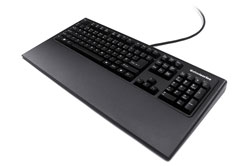
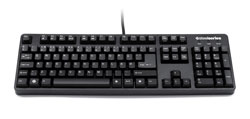 SteelSeries has long been known as a developer of high-end gaming peripherals and their ‘7G’ gaming keyboards keeps to this tradition well. It is the most solid and well-made keyboard I have ever had the pleasure of using.
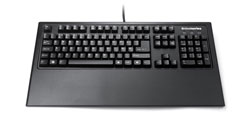 However, it is an all-metal design and can chafe if used for long periods of time. While SteelSeries has told us this design decision was made for durability purposes (gel rests can puncture and decay), and this makes sense, we recommend you put a soft barrier between the rest’s metal and your wrists for your own comfort.
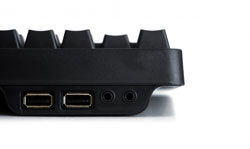
 This can be seen pretty much anytime your USB ports ‘freeze up’. While the PC processes what is going on, if you had a PS/2 keyboard installed it would still be able to pass on your key presses. Also, this allows the 7G to be used during your PC’s booting period where a USB keyboard might not have been detected yet. We would like to thank Mr. Rom for his helpful answers.
 Conclusion: If you are looking for the best ‘functional’ gaming keyboard possible, the SteelSeries 7G gaming keyboard is exceptional and well-worth its $150 dollar price point in that it very well could be the last keyboard you need to buy until the apocalypse, maybe. Even then, the thing might just hold-up fine. Unfortunately, nuclear testing was not part of our review regiment. Also, we cannot say what the value of the beast will be in bottle caps. Sorry, we have been playing Fallout 3 too much. The biggest complaint we can find about this keyboard is the lack of back-lighting. If you can get over not having the ‘bells and whistles’ and are able to afford it, the 7G is easily the keyboard for you.
 Developed by Ubisoft Montreal (Assassin’s Creed), Far Cry 2 is a mixed bag. Far Cry 2 puts players into the heart of an African country at war with itself. Your character has been sent there to assassinate a gun runner supplying to both sides of the conflict in an effort to stabilize the region. Unfortunately, on the way to your hotel, you come down with malaria and get caught up in a firefight. After this brief training mission, you get introduced to the leader of one of the nsides fighting each other and get impressed into service, taking on missions for them. And then Ubisoft Montreal adds the fun.
 Far Cry 2’s landscapes are fairly huge, with tons of broken terrain to navigate. Ubisoft Montreal created a 50km2 area for gamers to play in, and it does feel like you are in the middle of nowhere. Getting from one place to another can take up to ten minutes in some cases. This driving (yes, you can use vehicles in the game) is often interrupted by armed checkpoints and other things to shoot at, but trust us when we say you will have some time to admire the scenery. Ubisoft has put all manner of vehicles into the game, and you can drive most any of them. Should a vehicle become damaged, you can even pull off to the side of the road and make repairs. In jeeps with mounted machine guns, you can toggle which position you want to be in (driver/gunner). This toggle yields a cool animation of you pulling yourself through the roll bars behind the driver seat into the gunner’s position and vice versa.
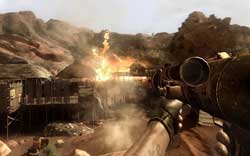 We would have liked to see enemy forces stumble upon the destruction and trickle in to re-position at these posts instead.
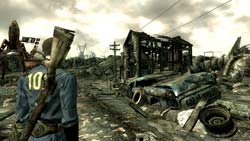 ‘War. War never changes’. It is with these words that began one of the greatest role-playing games ever made (of course I mean Fallout). The RPG and its sequel are renown for their tongue-in-cheek humor, stylistic design, and isometric gameplay. When we heard Bethsoft was taking the reigns on Fallout 3, and that it would be a first-person game, forums around the ‘net lit up with flame wars on the subject. Die-hards of the series naturally had a worry that by bringing the series into the first-person, Bethsoft would be taking away an aspect which made the previous games undeniably ‘Fallout’. We are pleased to say, however, that this worry has proven itself false. This is a Fallout game.
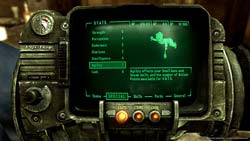 Thankfully, if you can get past the sense of sadness for the human race as a whole, you will find a gigantic amount of things to do and see. Quests can be found in abundance and it is very doubtful you will finish everything in one play through. In fact, your character’s level is capped at 20, making it very likely you will play the game over again at least a few times, trying different character builds. Bethsoft has stated numerous times that they wanted to increase the re-playability of the game immensely and they have succeeded in this feat. Of course, the low level cap is also probably some foreshadowing that forthcoming DLC will raise it somewhat for added quests, etc.
 When you are ready, simple click accept and the fun begins. The results of your stacked actions are shown in a cinematic, bullet-time, method with various camera angles and the like. The V.A.T.S. combat system can lead to some VERY cool-looking combat. For instance, using my Chinese pistol (which makes me feel a bit like Han Solo) I initiated combat with a raider. I queue up V.A.T.S. and assign two shots to the body, one to the left leg, and the last to the head and then click accept. The following ‘cut-scene’ (and I use the term loosely as it is all done in-game) blew me away and was completely unexpected. My two shots to the body blew the raider back a bit, obviously wounding him deeply. He turned around and began to run in an attempt to escape my wrath but he was not fast enough. My shot to his leg crippled him, sending him to the ground in a heap. My last shot finished him off with spectacular gore and violence. This kind of scenario does not happen all the time. However, it happens enough to make you want to continue using V.A.T.S. whenever possible. Using this mode drains you of action points (or ‘AP’) which must be recharged in real-time mode. This is just another example of the great lengths Bethsoft took in making Fallout 3 accessible to new gamers as well as fans of the original RPGs.
 A new feature in Fallout 3 that we have not seen before in the series is the ability to own your own home. In certain areas and by accomplishing certain tasks, it is possible to own your own residence. This provides you with a free place to rest and heal up as well as the ability to customize it with house-specific items like jukeboxes, first-aid stations, and more.
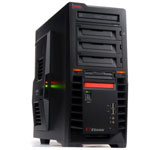 GMC, a Korean company, has been making its mark on the North American PC case market for a short time now. They usually offer cases with plenty of cool features and eye-popping designs. Their first gamer-specific enclosure, the X7 ‘X-Station’ is no different.
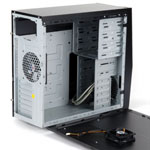 The X7 is designed with militaristic-looking black lines which lend themselves well to the gamer-centric motif. It actually reminds me of something you would see in Batman’s ‘Tumbler Batmobile’. The bezel features a couple of cool orange power lights as well as four USB 2.0 ports, power button, and reset button. We would like to have seen an eSATA and/or FireWire port on the front, but we digress. The X-7 also features a backlit LCD display which shows the case temperature and fan speed.
 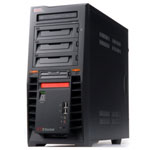 Inside the case, there is just enough room to accommodate a gtx 280 video card, making cabling somewhat of a challenge. This is not out of the ordinary though, as most cases have issues in this department.
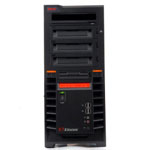 The case allows for up to four 3.5” drives to be installed, right behind the 80mm forward area fan to promote hard disk cooling.
 The ‘X’ series of space sims have always been known for their open-universe gameplay and freedom of choice. X3: Terran Conflict upholds this tradition along with bringing the story began ten years ago, in X: Beyond the Frontier, to a close.
 This feeling of hugeality (my word) is properly infused within the game. No matter how powerful you become, how rich, or how many ships you acquire, you are still just one person in a very humbling universe. Your starship’s user interface, while still full of complex options, has been refined as has controlling your space craft with your mouse (although I highly recommend a flight stick for the ‘full effect’). Navigating the menus is easily done, but make sure you are out of harms way before exploring them, it would be a shame for some pirates to get the drop on you! Based on the new features, it is quite clear that Egosoft has listened to the fans and has brought out a very complete product.
  In our