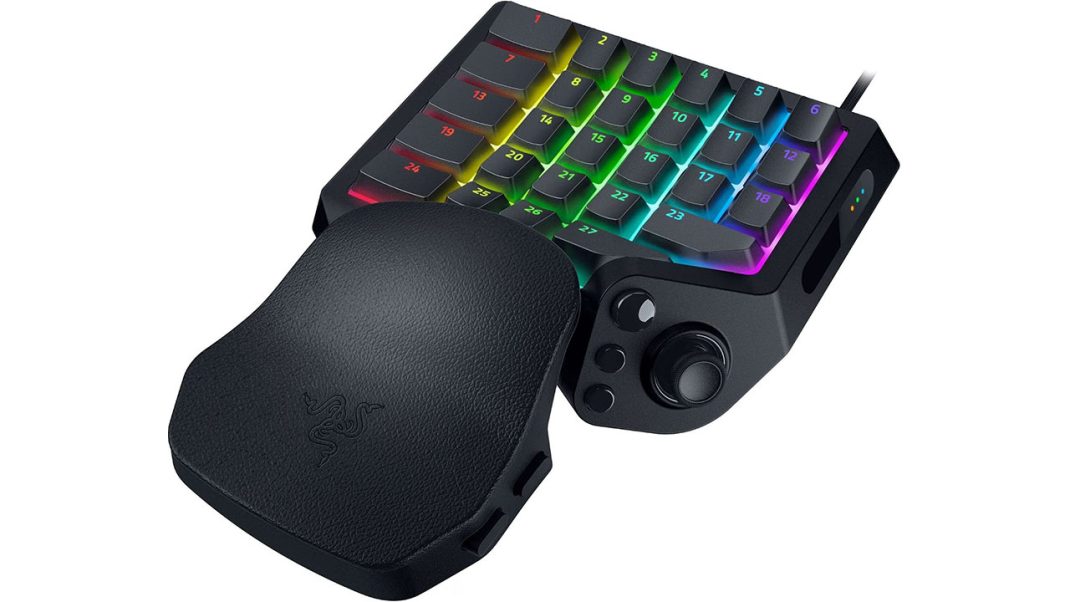
Standard keyboards were never built for intense gaming. Fingers must stretch across staggered keys, wrists bend at stiff angles, and critical hotkeys sit marooned across distant rows. The new Razer Tartarus V2 Pro arrives at $199.99 as a sharp, unapologetic fix for that desktop chaos. By slicing away the entire right side of a traditional deck, this one-handed keypad concentrates 31 programmable controls right under a single hand. Packed with Razer’s Gen-2 analog optical switches, an anti-drift magnetic thumbstick, and true 8000 Hz polling, it delivers blistering speed and deep customization.
Here is the core verdict: for massive multiplayer online raid leaders juggling twenty spells and first-person shooter fans chasing rapid strafes, this hardware is a genuine game changer. It offers outstanding tactile speed and welcome wrist relief. Yet, this remains a hyper-focused tool for dedicated enthusiasts. It carries a steep price, demands patience during software setup, and swallows a solid patch of desk room.
Does every PC gamer need a separate command keypad? Not by a long shot. But for players who spend countless hours managing crowded hotkey bars or seeking every physical edge in competitive arenas, this bold device refines a legendary concept into its sharpest form yet.
Nostromo Lineage and Modern Tech
Dedicated gaming keypads have a colorful history on the PC desk. Back in the day, the Belkin Nostromo SpeedPad n50 proved that PC control did not have to feel like typing a work report. Razer later adopted that lineage, turning it into the Orbweaver and the Tartarus. The Tartarus V2 Pro marks the first major refresh in years, and the mechanical polish stands out right away.
At first glance, a two-hundred-dollar half-keyboard looks like pure excess. Why add another gadget when a keyboard already sits right there? The secret lies in spatial freedom. Moving WASD controls and keybinds onto a compact, angled pad clears massive room on the desk. Low-DPI mouse players can swing their arms freely across broad desk pads without banging into a number pad or arrow keys.
Razer also upgraded the materials across the board. The main keys now wear textured doubleshot PBT caps that resist finger shine through sweaty summer tournaments. Under the hood, individual switch stems come pre-lubricated from the factory, seated over dense sound-dampening foam. Keypresses do not rattle or clatter; they produce a clean, deep sound that will not wake the entire house during late-night dungeon runs.
Wrist Break
Ergonomics make or break a specialized peripheral. Older keypads had a frustrating habit: they locked hands into fixed plastic contours. If a desk sat too high or an arm rested at a slight angle, the wrist suffered from nasty aches within an hour.
The Tartarus V2 Pro fixes this flaw with a fully adjustable wrist rest. The palm rest slides back and forth to fit long or short fingers. Even better, it pivots left and right. By rotating smoothly on a central mount, the rest adapts to natural forearm angles rather than forcing the wrist to sit straight.
Gamers fighting chronic joint pain or wrist stiffness will welcome this design with open arms. The palm rests softly on the pad, the knuckles stay arched without strain, and every primary key sits right where fingers expect it. It feels less like grasping hard plastic and more like resting on a custom armrest.
Fast Switches and Resets
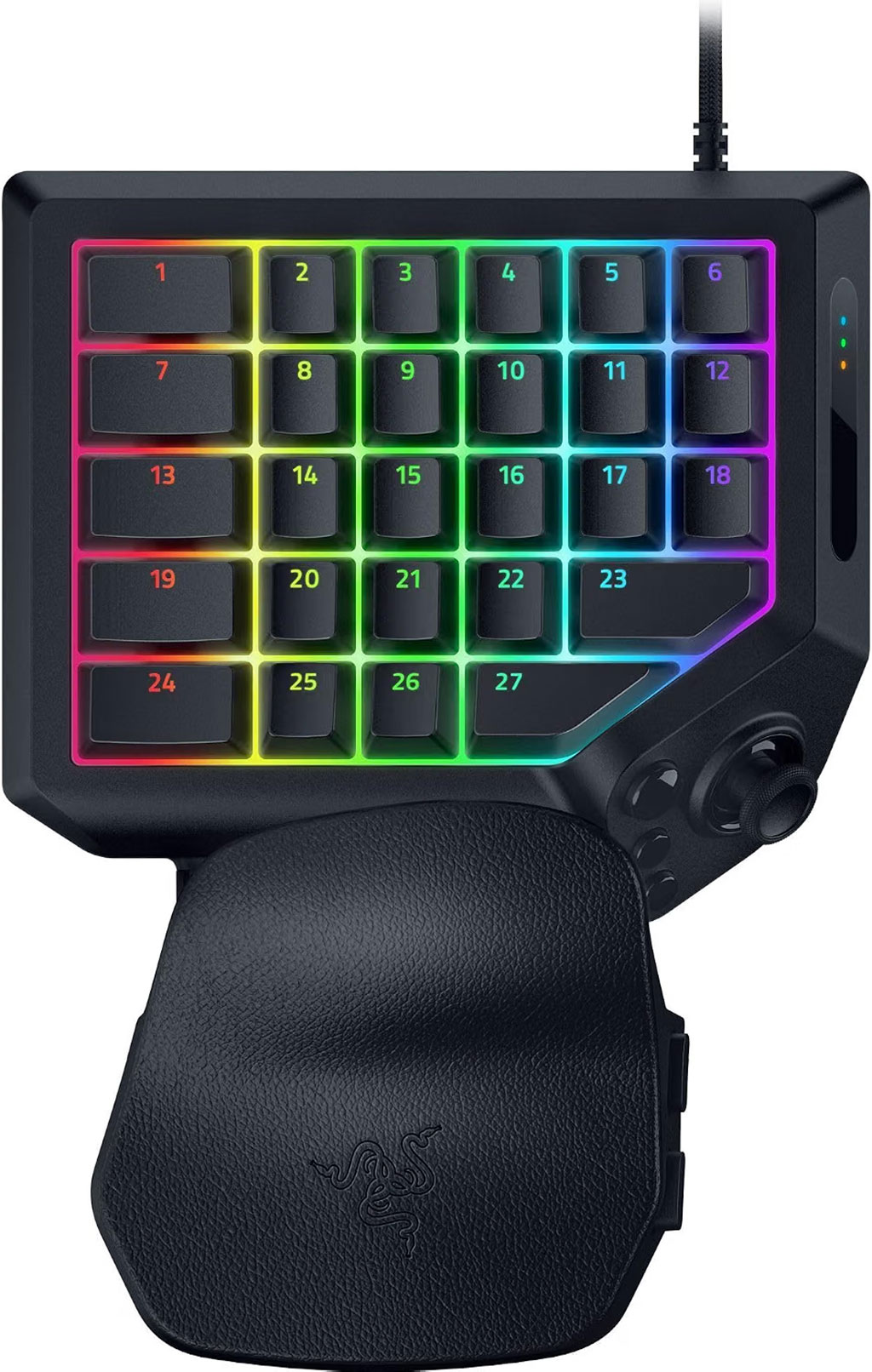
Under the PBT keycaps lie 27 keys driven by Razer Analog Optical Switch Gen-2 hardware. Traditional mechanical keyboards use copper leaf contacts that slam together. Optical switches use tiny beams of light. As the key goes down, an optical sensor measures the exact amount of light passing through the stem.
This optical tech creates two distinct perks:
- Custom Actuation: Players can set the trigger point for every key anywhere between 0.1 mm and 4.0 mm. Forward and side movement keys can trigger at a hair-trigger 1.0 mm for twitch reactions, while emergency shields or grenade tosses can require a full 3.8 mm bottom-out press to prevent costly accidental clicks.
- Rapid Trigger Reset: Standard switches must climb all the way past a static reset point before registering a second click. Rapid Trigger throws out static points. The switch resets the split second it begins moving back up, even by a tiny 0.1 mm.
In rapid combat, Rapid Trigger feels like pure witchcraft. Stutter-stepping and jiggle-peeking corners in tactical shooters happen with absolute speed. Because optical switches lack bouncy metal contacts, debounce delay drops to zero. The switches are also immune to magnetic interference and carry a massive rating of 100 million clicks.
That Magnetic Stick
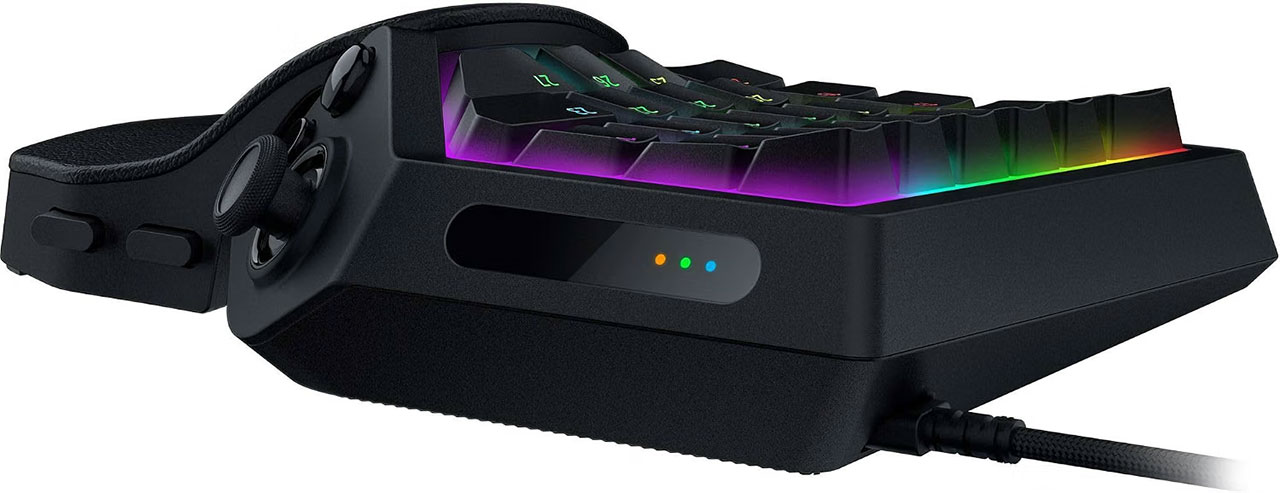
The thumb cluster is where Razer took its boldest design gamble. Older Tartarus models used a “clicky” directional d-pad. The V2 Pro swaps that out for a full-sized Tunnel Magnetoresistance (TMR) thumbstick. TMR sensors track stick position by measuring magnetic fields. No physical contacts rub together, which means stick drift, the bane of modern controllers using HAL effect sensors, is completely eliminated.
The package includes three swappable thumbstick caps: short concave, long concave, and short convex domes. Three dedicated side buttons wrap around the stick, giving the thumb immediate control over jumps, crouching, and voice toggles.
Honestly, there is a small catch worth noting. At launch, the TMR stick functions as an eight-way or four-way directional input rather than a true 360-degree analog stick. Razer has stated that native analog stick emulation will arrive in a future update. In the meantime, mapping the stick to WASD or radial inventory wheels works brilliantly. Flicking the stick up to reload or right to swap weapons quickly becomes second nature.
The keypad also packs Razer’s Advanced Input Control suite. This includes Snap Tap, which prioritizes the newest keypress between two directional inputs without lifting the first. Competitive players should keep in mind that games like Counter-Strike 2 ban automated Snap Tap. But for casual shooters and MMOs, Snap Flex (triggering different actions on key press versus key release) and Dynamic Keystroke (chaining up to four commands on one key stroke) make long spell rotations feel effortless.
Synapse Magic
Razer Synapse serves as the nerve center for all this hardware muscle. Through the software, gamers can rebind every button, build complex multi-action macros, and activate HyperShift to double the total command count. Storing up to 24 keymaps across onboard profiles lets players hop from World of Warcraft to Marvel Rivals with a tap of the side profile button.
Here’s the thing: setup feels like serious homework. Tuning 31 buttons, setting individual actuation depths, and testing Rapid Trigger points takes real patience. Expect to spend an entire afternoon tweaking profiles before stepping into a ranked lobby.
Fortunately, players do not need to alt-tab out of games just to tweak switch feel. The Tartarus V2 Pro sports an onboard LED array right on the casing. Through simple button combinations, gamers can adjust actuation travel and Rapid Trigger sensitivity on the fly, checking the LED light pattern to confirm changes.
The keypad also supports true 8000 Hz HyperPolling. At 8000 Hz, input latency drops below 0.125 milliseconds. Does an everyday gamer need polling eight times faster than standard gear? Probably not, and running 8000 Hz does draw extra CPU resources on older gaming computers. But for those running high-refresh monitors and cutting-edge hardware, the responsiveness feels lightning-fast.
Should I Buy It?
The Razer Tartarus V2 Pro stands as a triumph of bold, niche engineering, elevating the one-handed keypad from an oddity into an elite competitive weapon. At two hundred dollars, it requires a serious financial leap and demands some serious profile tuning to rebuild long-standing keyboard habits. But by combining Gen-2 analog optical switches, an everlasting TMR thumbstick, and a rotating wrist rest that saves joints from fatigue, Razer has built the most capable gaming command station money can buy. For gamers ready to leave the clutter of traditional typing decks behind, this device rules its category without rival.
Overall Rating 4 out of 5
Pros
- The Gen-2 analog optical switches, Rapid Trigger reset down to 0.1 mm, and true 8000 Hz HyperPolling deliver top-tier speed and precision.
- The sliding, rotating wrist rest and textured doubleshot PBT keycaps provide long-session comfort and joint relief that traditional keyboards cannot match.
- The magnetic TMR thumbstick completely eliminates mechanical wear and stick drift.
Cons
- At $199.99, it represents a hefty financial investment for a specialized peripheral.
- Configuring 31 mappable controls, actuation travel depths, and macros requires some patience.
- Out of the box, the TMR stick functions as a 4-way or 8-way directional input rather than providing true native 360-degree analog stick emulation.