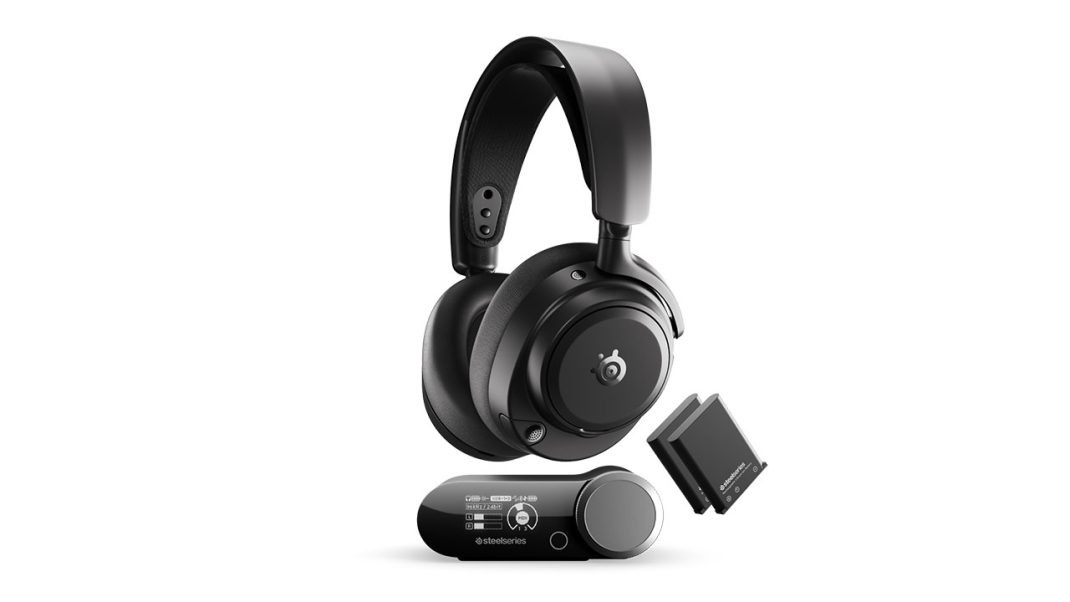
If your desk looks like a giant spider web of cords, I feel your pain. Between a custom PC, a PS5, an Xbox, and a Nintendo Switch, my gaming setup used to look like a complete cable disaster. Keeping track of three different headsets just to hear in-game sound on different systems is a total nightmare.
SteelSeries wants to cure this headache. They launched the Arctis Nova Pro Omni on May 5, 2026, for $399.99. This headset aims to be the only pair you will ever need to buy. It sits right below their $600 flagship, the Nova Elite. But does it actually do enough to earn a spot on your desk? Let’s check it out and see if it is worth your hard-earned cash.
Build Quality?
Let’s be honest. When you spend four hundred dollars on a headset, you want it to feel like a premium piece of tech. The Omni does not. While the fancy Elite uses luxury metal parts and brass, the Omni relies mostly on plastic. Even the sliders on the earcups feel a bit cheap. They make a scratchy, grating sound when you slide them up and down.
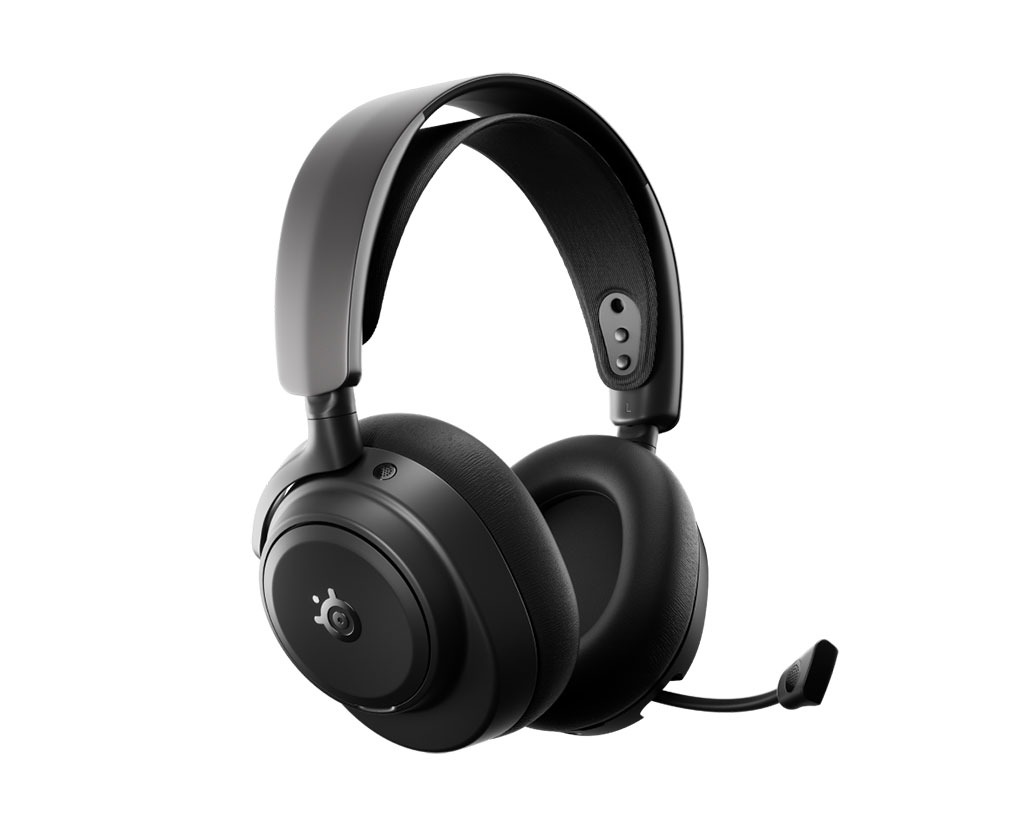
But you know what? There is a major upside to using more plastic. It is light. The Omni weighs just 339 grams, while the Elite is a heavy 380 grams. It feels wonderfully light on your head. SteelSeries uses their classic ski-goggle-style headband that floats on your skull. It spreads the weight so well that you can wear it for hours.
The vegan leather ear cushions are thick and plush. They seal out noise great, but they do trap heat. Your ears will get warm after an hour of gaming. Still, the fit is so cozy that you won’t mind too much. It’s a nice change from older headsets that clamped your jaw like a vice. Especially once you see the magic box that sits on your desk.
The GameHub
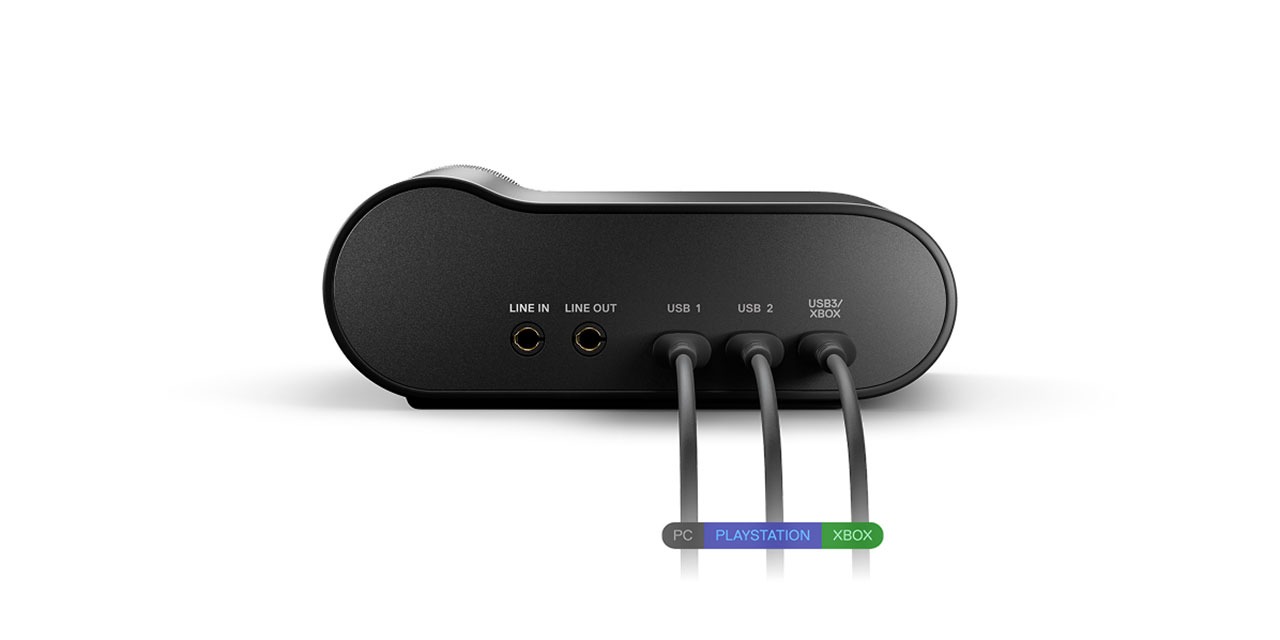
Here’s the thing that makes this headset special: the GameHub. It is a little desktop box with an OLED screen and a big volume wheel. On the back, you get three USB-C ports. This is huge. Usually, console makers force you to buy different versions of the same headset because of security chips. Not here. One port has the special chip needed to work with Xbox. The other two work with PC, PlayStation, or your Switch.
It also features “OmniPlay”. This lets you connect up to five devices and play sound from four of them at the exact same time. Want to play a game on your console, chat on Discord on your PC, and listen to music from your phone via Bluetooth? You can do all three. There is no delay or drop in sound quality when you do this. It works seamlessly. Plus, when you turn the headset off, the hub automatically sends your sound to your desktop speakers through the line-out port. No more cable swapping.
Footsteps, Gunfire, and Gaming Frequencies
How does it sound when you’re actually playing? In short: excellent, but with a slight catch. The Omni uses classic 40mm neodymium drivers. Out of the box, the sound is clean and detailed, but the high frequencies are very bright. In games like Counter-Strike 2 or Marathon, this is a total superpower. You can hear footsteps and weapon swaps with laser precision.
But if you listen to acoustic music, that high-end boost can make voices sound sharp. It gets quite sibilant. Luckily, you can fix this. If you are on PC, the Sonar software gives you a powerful EQ to adjust everything. For console players, SteelSeries finally added a mobile app. You can adjust a custom EQ on your phone and save it directly to the headset’s brain. I tested this while playing Diablo 4, and boosting the bass made the combat sound wonderfully meaty. But what happens when you run out of juice mid-fight?
The Swappable Battery
Let’s talk about power. SteelSeries boasts “infinite battery life”. How does that work? They give you two batteries in the box. One lives in the headset, and the other charges inside the GameHub. When your headset runs low after about 30 hours, you pop off the magnetic earplate and swap them. You are back to full power in seconds.
But here is a funny contradiction. SteelSeries says you get non-stop play. In reality, the moment you pull the battery out, the headset dies. It has no internal capacitor to keep it running during the swap. The headset has to reboot and find the wireless signal again. It is a tiny step back from the pricier Elite, which stays on during swaps. Still, waiting five seconds for a reboot is much better than plugging in a charging cable. Of course, keeping your head in the game also means blocking out the rest of your house.
ANC, Transparency, and the Retractable Mic
The active noise cancelling is surprisingly good. The four-mic system blocks out low hums like PC fans, traffic, or a washing machine. It is perfect for getting lost in single-player games. However, it won’t block out sharp sounds. If a dog barks or a baby cries, you will still hear it. The transparency mode works well too, letting you hear your own voice naturally during calls.
Then we have the ClearCast Pro microphone. It retracts fully into the left earcup, which is nice if you want to wear these outside. The cool part is the on-board AI noise cancelling. It runs on the headset itself, so it works on Xbox and PlayStation without needing PC software. It blocks background noise like magic. But there is a trade-off. The processing is so aggressive that your voice can sound heavily compressed and a bit unnatural. It is fine for Discord, but don’t expect it to replace a real desktop mic. And speaking of limits, let’s talk about the actual bugs I ran into.
Bugs and Quirks
No tech is perfect, and the Omni has some annoying bugs. First, when you connect to your phone via Bluetooth, the volume is surprisingly low. You have to turn the volume wheel way past the halfway mark just to hear properly.
Second, if you use the 2.4GHz wireless and Bluetooth at the same time, the mic automatically routes only to the Bluetooth stream. You can’t take a quick phone call and stay in your PC game chat at the same time. Third, some users complain that the Bluetooth play/pause button on the right earcup doesn’t work when connected to a PC.
And lastly, there is a weird hiss. If you have ANC and Bluetooth turned on together, but no music is playing, you might hear a faint high-frequency buzz in the right earcup. It seems to be a shielding issue in the hardware. Also, that OLED screen on the GameHub runs constantly, which means static icons could cause screen burn-in down the road. I wish they used an E-Ink screen instead. That brings us to the final question: is this headset actually worth your hard-earned cash?
Is It Worth Your Cash?
At $400, the SteelSeries Arctis Nova Pro Omni is a serious investment. If you only play on one console or just a PC, this is total overkill. You are better off buying a cheaper headset like the Logitech G Pro X 2 or Corsair HS80.
But if you own multiple systems and hate swapping cables, this thing is a godsend. It gives you almost all the features of the $600 Elite for two hundred dollars less. The plastic build feels a bit cheap, and the mic is heavily processed, but the incredible connectivity and the dual-battery system make it the ultimate daily driver. If you want one headset to rule your entire gaming life, the Omni is hard to beat.
Overall Rating 5 out of 5
Pros
- Universal console compatibility
- Mixes four audio sources
- Hot-swappable dual batteries
- Very lightweight build
- Great mobile app EQ
Cons
- Reboots during battery swap
- Heavy plastic build
- Compressed microphone audio