Archive - 2013

Cruise Control App Adjusts Music Rhythm in Real-Time

mzl.plyfkayw.320x480-75

Burnaby, B.C. Canada – January 4, 2013 – By adjusting the tempo of your music in real-time, Cruise Control uses songs from your favorite playlists to control your running pace and heart rate. Simply plug in your target pace or rate and start running. By matching your footsteps to the music’s tempo, you can be confident you’re hitting your pace or heart rate goal. The Cruise Control App is available today in the Apple App Store for $4.99.

Get ready to rock your run! Part coach and part dance partner, Cruise Control produces a magical running experience – Download here: https://itunes.apple.com/us/app/cruise-control-run/id586453280?mt=8

Cruise Control is the brainchild of biomechanics researchers Mark Snaterse and Dr. Max Donelan. “Cruise Control is based on our recent scientific discovery,” says Dr. Max Donelan, biomechanics professor at Simon Fraser University. “We found that it is possible to accurately and rapidly control people’s running speed or heart rate using auditory feedback. To turn this esoteric, scientific finding into a compelling user experience, we worked with some excellent App developers to build a full-featured music playing running app for the iPhone. Imagine flying down the trail at exactly the speed you want, with every beat of every song on your playlist synchronized to your footfalls. It feels like your favorite band is right there with you, timing their kick drum to drive you faster and further.”

The Experience

It’s called Cruise Control because it works like the cruise control in your car. Set your target and the App will automatically begin adjusting the music’s tempo, just like a car adjusts the throttle. As the music tempo increases, so does your pace, quickly pushing you to your target speed and then keeping you there. You can forget about how fast you’re running and just listen to the music, matching your foot strikes to the beat. Cruise Control automatically pulls good running songs from the music already on your phone into the app. As the tempo increases and decreases, the music’s sound and pitch remain unchanged, keeping the songs sounding like the music you’ve grown to love.

The Control

There are four ways to Cruise Control your run:
Pace Mode – Pick a target speed and go. Simply match your foot strike with the music and let the rhythm take you to your target pace. Lab tests show that with a little practice this is extremely accurate at reaching and maintaining your targeted pace, with an average error of less than 2%.
Heart Rate Mode – Similar to the Pace Mode, just match your steps to the beat and let the music guide you to your target heart rate and keep you there. Lab tests show that this mode is also very accurate, with an average error of about 2 beats per minute (BPM) of the target heart rate (heart rate monitor required).
Cadence Mode – Plug in your goal strides per minute (SPM) and the let the music tempo take you there.
Free Run Mode – Just head out for a run while listening to your tunes. Cruise Control will automatically match the music to your running rhythm.

The Science

Dr. Max Donelan and PhD candidate Mark Snaterse from the Locomotion Lab at Simon Fraser University used a combination of human experiments and control theory to develop algorithms that control your running speed and intensity in real-time. While the App may seem like magic, under the hood is strong scientific theory backed by careful experimentation and solid engineering. The result is an App that will repeatedly deliver accurate results and help runners meet their running goals.

The Extra Sauce – Cruise Control’s additional features include:

• Easily select your favorite songs into epic running specific playlists.
• Switch songs, change playlists or use the thumb-up and thumb-down feature to keep track of those great and not-so-great tunes.
• Accurately measure running pace and cadence using the iPhone’s built-in sensors.
• Pair with ANT+ and Bluetooth Smart heart rate monitors and stride sensors for even more running data. Check out our favorites from our friends at Wahoo Fitness (www.WahooFitness.com).
• View your pace, cadence, heart rate and route map as you run including current, average and maximum values.
• Review your running history including mileage, distance, map, pace, cadence and heart rate.
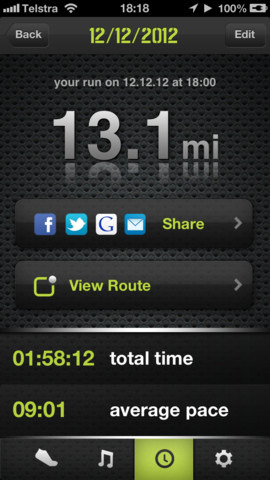
• Share your runs via Facebook, Twitter and Google+ or email your runs including all your data for uploading to your favorite training website (including MapMyFitness, RunKeeper, Nike+, TrainingPeaks, GarminConnect, MapMyTracks, 2Peak, dailymile, Strava, or Dropbox).

Cruise Control is compatible with iPhone 5, iPhone 4S and iPhone 4.

Follow Cruise Control on Twitter @CruiseCtrlRun, to receive running song recommendations or check www.cruisecontrolrun.com for run-tested playlists.

Sexiest CES Product Ad?

voco-1

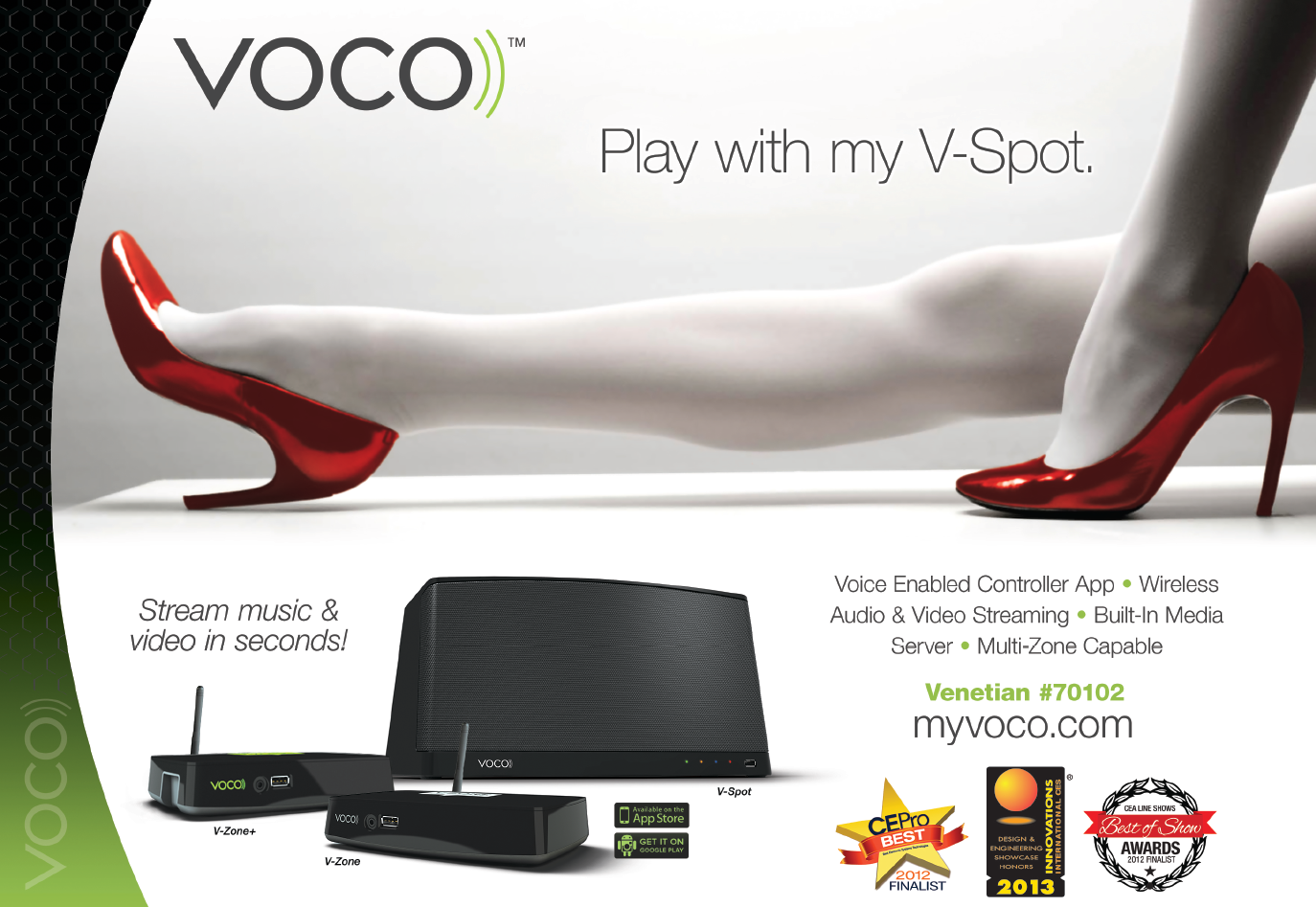
VOCO, a company that is premiering some streaming audio & video products at next week’s Consumer Electronics Show in Las Vegas, has sent out two provocative and head-turning product showcase ads featuring their… products. While they may have won some CES Innovations awards already, we are giving them the “Sexiest CES Product Ad” award.  Basically, when I see these two images, technology is the last thing on my mind – 🙂 Enjoy!

Oh, here is the second one…

voco-2

Elite: Dangerous Makes Kickstarter Goal

elite-wallpaper1`

3rd January 2012.  Cambridge, UK:  Frontier Developments (“Frontier”) is delighted that its Kickstartercampaign for the ‘Elite: Dangerous’ game has reached its funding target of £1.25M attracting over 21,000 backers.

“Thank you to everyone who helped us reached that total – it’s incredibly heartening and uplifting to see so many people supporting Elite: Dangerous,” said David Braben, CEO of Frontier and co-author of the original Elite. “The help, feedback and ideas given and the enthusiasm shown has been remarkable, vividly illustrating the power of the community which is a force to be reckoned with in today’s connected society.  This has made us even more determined than ever to produce a game worthy of such support and engage even further throughout development.”

The Kickstarter project <gp_link type=”http” loc=”//kck.st/YN6rVC”>http://kck.st/YN6rVC is still accepting pledges until midnight GMT/7pm EST on Friday 4th January 2013 as the team pushes towards stretch goals of Mac support and increased numbers of playable ships, in response to requests from the community.  A PayPal payment option is also available via Frontier’s website elite.frontier.co.uk which will continue to accept contributions  after the Kickstarter project closes.

The Elite:  Dangerous Kickstarter campaign has generated over 100,000 comments so far on the project’s page, which Frontier believes is a current record for the site.

David Braben will be hosting a Reddit AMA at 5pm GMT/noon EST today.

Elite:  Dangerous is due for release on PC in March 2014.

ARCHOS Unveils TV Connect

archos-tv-connect

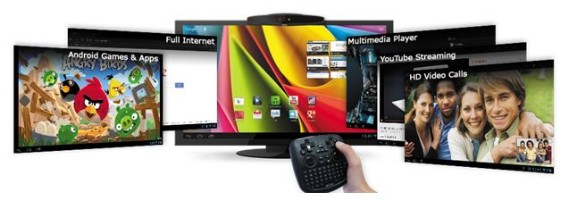
Denver, CO – January 03, 2013 – ARCHOS, a pioneer in multimedia portable devices, is pleased to announce the ARCHOS TV connect, the only multi-touch “AndroidTM on TV experience” for your apps and games. The ARCHOS TV connect turns any HDTV into an Android powered smart TV providing the full Android ecosystem with a specially designed TV Touch remote.

The TV connect allows you to control your TV just like a tablet – tap, swipe, zoom in, zoom out, select or type. With the TV connect users will be able to play games, stream videos, video chat in HD, email friends or surf the web all from their big screen TV. The ARCHOS TV connect runs Android 4.1TM ‘Jelly Bean’ and will be available starting in February, 2013 for $129.99.

“As a pioneer in multimedia Android devices, we wanted to create a bigger, better way to enjoy Android,” says Henri Crohas, Founder and CEO of ARCHOS. “The ARCHOS TV connect provides users with a multi-touch, multi-media Smart TV experience powered by AndroidTM.”

Revolutionary TV Touch remote – A smartly designed remote for every task

  • Pointer – Allows you to control your TV just like you would your tablet with a tapping and/or swiping motion
  • Full multi-touch gesture support – Control your apps easily with zoom in, zoom out and rotate with ARCHOS developed unique gesture controls
  • Full keyboard with Android shortcuts – The TV touch remote includes a full keyboard and Android shortcut keys including a key for voice controls and voice typing

Play Android Games on your TV – Critically acclaimed games at your fingertips

  • Thousands of games available on your TV – Choose from over 700,000 apps and games on Google PlayTM
  • Dual thumb sticks and buttons – Play all your favorite games with full gaming controls and dual analog thumbsticks
  • ARCHOS Gaming Mapping Tool – Map the controls of games to the buttons and controllers of the remote for playing virtually any game on your TV – as recently introduced on the GamePad

Turn your TV into a Smart TV – Get a full web experience on your current HDTV

  • Internet – Surf on the net from a big screen
  • Online video streaming – Stream videos directly on your TV through YouTubeTM, Daily motion and other video applications
  • Emails – Send and receive emails or share photos from your Facebook page with friends

HD video calls – Connect with a group of friends or family members on a big screen

  • HD webcam – ARCHOS TV connect is equipped with an HD webcam for High quality video calling
  • LED notification – LED lights notify you when you have an incoming calls while watching TV
  • Compatibility with all popular video calling apps – Video chatting with Skype or Google TalkTM as a family from your sofa has never been easier

Multimedia Player – The ARCHOS TV connect includes the critically acclaimed ARCHOS Media Center applications so you can finally get control of your home media content, including:

  • Best video codecs and format support – Read all your favorite video files with format and codec support including H.264 decoding in full 1080p HD
  • Media Center Library – Tailor-made UI with automatic jacket, synopsis and subtitle download as well as library organization even for files stored elsewhere on your home network
  • Easy home streaming – Stream your media content over your home network either through WiFi or Ethernet
  • The right connections – Features HDMI (cable included), full USB host and micro SD slot
  • Google™ Certified with Full Access to shop on Google Play™ – With over 700,000 applications, get all your favorite Android content on your TV including books, music, magazines and movies

ARCHOS at CES 2013 – Come experience the ARCHOS TV connect first hand during CES 2013 in Las Vegas, NV from January 8-11. In addition to the TV connect, ARCHOS will be showing off its new line up of tablets which include the recently announced GamePad and new entrants to the ARCHOS Elements line – the dual-core Titanium range and the quad-core Platinum range, both of which feature tablets with stunning 2048×1536 resolution IPS screens. The ARCHOS booth is located in Central Hall (15322) of the Las Vegas Convention Center.For more information about the ARCHOS TV connect or ARCHOS at CES visitwww.ARCHOS.com.

Mad Catz Unveils GameSmart Initiative

GameSmart-MicroSite-Header

San Diego – January 3, 2013 – Mad Catz Interactive, Inc. (“Mad Catz”) (NYSE MKT: MCZ) announced today GameSmart, a technology initiative that moves smart devices one step closer to delivering a core gaming experience similar to a gaming console or gaming computer.  GameSmart control products will function through the Bluetooth® Smart stack, will be game and hardware independent, and will have a smart device app to provide additional functionality.  By utilizing Bluetooth Smart, GameSmart devices will feature simplified setup, longer battery life and universal compatibility.  In addition, GameSmart offers game developers and game publishers standardization, ease of implementation and scalability when enabling controller and console-like accessory functionality in mobile games.

“Smart devices have made considerable inroads in delivering all forms of entertainment including games, music, movies, books, and social media.  Mobile gaming is a vibrant and exciting space and we don’t see controller-based games replacing touch screen games, we expect them to enhance and enlarge the smart device gaming experience to include the living room experience.  There are a number of point-to-point solutions in the market today that provide proof of concept, but the industry needs an agnostic operating system solution to provide standardization, ease of implementation and scalability,” said Darren Richardson, the President and Chief Executive Officer of Mad Catz Interactive, Inc.  “With our long history in the gaming industry, Mad Catz has the technical capability, product breadth, global distribution, and developer and publisher relationships that uniquely position our company to make this ambitious initiative a success.  We believe the GameSmart initiative fits perfectly with our long-term strategy of designing innovative products for passionate gamers.”

Mad Catz intends to launch a full range of GameSmart products, including game controllers, gaming mice, gaming keyboards, headsets, and other specialty controllers.  The GameSmart products will also be app-enabled to provide additional functionality.  The first wave of GameSmart products will be announced at CES 2013 and are expected to launch shortly thereafter.

Additional information available at: www.madcatz.com/gamesmart

MSI Rolls Out New Products for CES 2013

msi-slidebook-s20_1356349095

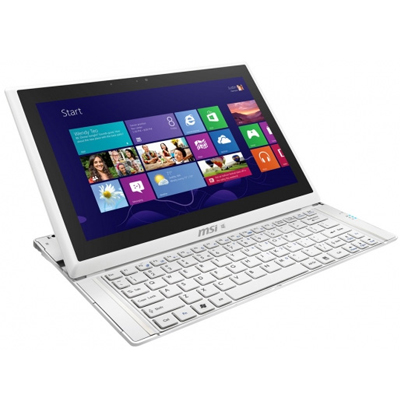
City of Industry, Calif. – January 3, 2013 – MSI Computer Corp, a leading manufacturer of computer hardware products and solutions, announces the availability of the Slider S20 Ultrabook Convertible, a clever blend of portability and performance featuring a slide out keyboard, Windows 8 and Intel® Core i5 processor.

The Slider S20 is the perfect companion for business travelers, students and all users seeking computing power without sacrificing portability and battery life.  Equipped with state-of-the art components, including a16:9 1920×1080 full HD 10-point touch screen, 8GB of DDR3 memory and 128GB of SSD storage, the Slider S20 weighs 2.2 lbs. and is less than 1 inch thick for lightweight on-the-go computing.

“Many users prefer the mobility of a tablet, but still need the processing power of an actual laptop computer,” said Andy Tung, vice president of sales for MSI US.  “MSI’s S20 Ultrabook Convertible solves that problem by combining the best of both worlds, giving users the choice of using it as a tablet or as a laptop.”

To perfectly complement its performance, MSI also designed the Slider S20 for easy connectivity, with a Jackson Peak Wireless adapter, Ethernet, 2 USB3 ports, Bluetooth capability, mini HDMI-out connector and an integrated 720P HD webcam.  The Slider S20 will be available in Q1 2013 for $1,199.99 MSRP.

For more information on the Slider S20, MSI’s entire family of mobile solutions, visit http://www.msimobile.com