

Electronic Arts has announced a new DLC pack for their popular racer, Need for Speed: Shift. The Exotic Racing Series DLC pack will be available on March 18th for the Xbox 360 and PS3. The pack will contain seven new cars as well as one new race track.
Archive - 2010
Maybe it just shows my unadulterated nerditude but seeing the Recognizer for the first time in this new trailer for the upcoming TRON Legacy gave me some serious goosebumps. Anyway, the film is due out December 17th of this year and will be released not only in standard formats but also IMAX 3D – which will undoubtedly be the only way to see it.
Turtle Beach has been in the gaming headset business for a while now, and their previous Xbox 360 wireless headset, the Ear Force X4, was a solid solution for gamers. However, they have released the new Ear Force X41 and blown the lid off of the console headset market.
DESIGN
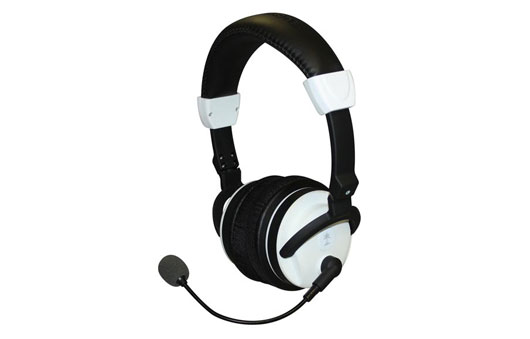
The Ear Force X41 features a hard plastic frame with the head band wrapped in comfortable, padded material. The ear cups are primarily foam mesh with also a good amount of comfort and fit nicely around the ear so that you do not get earache after a few hours of usage. The snake microphone protrudes from a pylon on the left ear cup with a limited pivoting ability. On the bottom of the left ear cup you will find the headset controls. You will find a power button, game controller jack, bass boost button, and game volume slider. The right ear cup slides open to reveal the unit’s power source: Two AAA batteries.
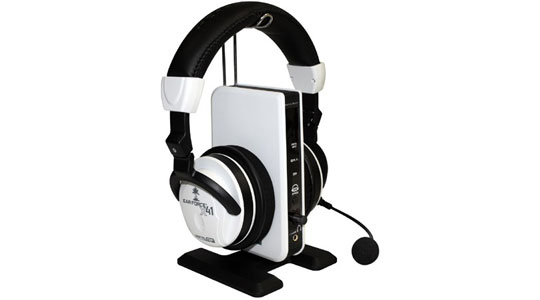
The base station features an array of status lights on the front of the unit as well as an input sensitivity volume dial. Conveniently, extending from the top of the base station is a metal stand which you rest the headset on. This makes storing the X41 much more feasible and attractive, visually-speaking. The base station connects to and is powered by the Xbox 360 console via USB cable.
INSTALLATION
Installing the X41 is very simple. Just plug the USB cable from the base station into the Xbox 360, then put the included AAA batteries into the headset unit. Turn it on, set your volume levels, and you are all-set for gaming goodness. Also, don’t worry about turning the headset off when done playing, the unit will detect the inactivity and turn itself off shortly after playing ceases.
SOUND
The ear cups each contain one 50mm driver with neodymium magnet. The frequency response is good, with a range of 20Hz – 20kHz, and the unit even features a bass boost. Utilizing Dolby Digital, Dolby Pro Logic IIx, and Dolby Headphone surround processing technologies, the virtual 7.1-channel sound in the Ear Force X41 is believable and crisp, due in part to the 2.4GHz radio connection to the base unit. This is in contrast to the X4’s IR connection, which needed a line of site path to the base station. With this new connection protocol line of site is not a necessity.
Additionally, the in-game voice chat is exceptional as the headset features several automated functions to help this aspect along. The headset features a ‘Chat Boost Dynamic Talkback Expander’ module, which dynamically increases or decreases the voice-chat volume as the actual game volume changes. This system works very well and when things got hot and heavy in Left 4 Dead 2, other players were still audible as opposed to when they were drowned out by gunfire without the X41. The headset also features microphone monitoring which allows you to hear your own voice/volume levels while you speak. This helps avoid ‘shouting’ syndrome, where you lose control of your own volume, having your hearing hijacked by the headset’s closed audio environment. Another wonderful feature of the Ear Force X41 is that the voice-chat volume and game audio volume are controlled by different rotary knobs. This means that you can customize a balance between the two based on your preference, not what the hardware or game company preset it to be.
ISSUES
There are only two real issues with the X41, one of which is not even the fault of Turtle Beach. The first issue is that the new headset uses standard AAA batteries. I would much rather the X41 come with a rechargeable battery and a charger on the base station. One way to circumvent the battery issue is just to use your own rechargeable AAAs but I digress. The second issue which is not the fault of Turtle Beach is the use of the Xbox 360 game controller cable to tether the controller to the headset in order to get voice-chat capability. Unfortunately, this is one of Microsoft’s rules and won’t be fixed until they allow voice-chat to be sent wirelessly as well.
OVERALL
The Turtle Beach Ear Force X41 gaming headset is the best wireless headset solution you can get today on the Xbox 360 when looked at from a dollar to value ratio. You would be hard-pressed to find any other system out there capable of what the X41 can do for less than its $200 dollar price point. If you are in need of a wireless headset for your Xbox 360, you need to get one of these – you will not be disappointed.
*DISCLOSURE: Turtle Beach sent GamingShogun.com an X-41 unit for the purpose of this review.
Quantic Dream has always been about raising the bar in their video games. With the engaging story of their previous title, Indigo Prophecy, it made players actually think for once about what their actions might do to the future of the game world. Heavy Rain is no different and, right from the beginning, really throws your mind for a loop.
STORY
If you are a regular reader of our fine website, then you know that the most important thing to me as a video gamer is an engaging story. When Heavy Rain was announced I followed its progress like a hungry dog ,waiting to feed on what was promised. After having playing through the entire game, Heavy Rain is easily one of the most epic, story-driven games I have ever played. In no other game have I felt as engaged as I did when playing this game.

While I wont go into any of the story details I will tell you that you start the game out as Ethan Mars. Ethan Mars is your typical dad thrown into the fire by a series of very unfortunate events. These events lead you on a quest to find out who the elusive ‘Origami Killer’ is. The tutorial level starts out as Ethan is waking up to what seems to be any other day. You learn how to control the game by doing every day activities such as brushing your teeth or playing with your kids. This is also where you learn that the decisions you make in Heavy Rain are permanent and can alter the way the game shapes itself. Feel like watching TV instead of doing Ethan’s work? Guess you will just have to see where that leads you…
As you move through the Heavy Rain story, you branch off to play several different characters. Each character has his or her own part to the story and they all end up weaving together in their fight against the Origami Killer. There were many occasions while playing through Heavy Rain when I felt like I was playing the movie Seven. At points in the game I felt regret for some of the decisions that I made and some of the gameplay moments triggered emotion in not only myself, but also people that watched me play through. I live with a few people who are not gamers and they, for the first time, actually wanted to sit and watch me play a game. Any dev team looking to create a game with a heavily story-driven element needs to take notes from the Quantic Dream folks. One final note on the story: I want to make it known that I only played through the game once. Sure, I could have gone back to change my decisions but I felt that it would really mess with the experience. Heavy Rain is a game best played once and then passed off for someone else to experience.
GAMEPLAY
The gameplay in Heavy Rain is very much a ‘Choose your Own Adventure’ type game. While you do use the R2 button to walk your character around the main actions are done by stick motions or button pressing in quicktime event-fashion. Let’s say that your character’s hands are tied and you need to break a piece of glass to cut through a rope. An action sequence will pop up and if you don’t hit the buttons in time it will either start you over or change the way the scene plays out. The speed in which you move a control can affect things as well. Moving a direction too fast can cause you to negatively affect certain situations that you are in.

I found that the quicktime event controls in Heavy Rain were implemented well and easy to use. The one negative about the controls would be that the movement control is plain clunky at times. There were some weird cases where I attempted to walk one direction but my on screen character decided he wanted to spin in circles. The great thing about the controls in Heavy Rain is that even if you are not a hardcore gamer you can still really enjoy this game.
GRAPHICS AND SOUND
Heavy Rain really shows off the power of the PlayStation 3 graphics engine. While the graphics look somewhat different from the early screens which were released for the game, everything really is a pleasure to look at. The character animations really show how emotion can be displayed in a video game. There were times in the game that you could feel what kind of pain a character was going through just by looking at their expressions. The same can be said for the environments in Heavy Rain – there is not a moment that goes by that you do not feel that something is going wrong in this city. As the story progresses you can see that people look unsettled and on-edge by the events going on and the environment seems to adapt to that.
The sound in Heavy Rain has to be the one real lowpoint in the entire game. The voice acting in some cases is just down-right horrific. When you are trying to build a game around and engaging story, it is almost a necessity that the character voices match to who they are. Some of the voices just seemed like they were trying too hard to come across as an American accent. There was a point in the story where some of the kids voices sounded like they were being forced through an auto-tune. Hopefully for Quantic Dream’s next game they focus a bit more time in the voice acting department and hire some actors actually from where the story is meant to take place.

While playing Heavy rain I did not encounter any graphical anomolies, however I did come across several voice issues. There were points in the game where the speech simply did not match what was being said by the characters on screen. This happened enough in the game to be noticeable – lyp synching, anyone?
FINAL THOUGHTS
Heavy Rain is the blockbuster that the PlayStation 3 desperately needed. It is an engaging story to play through and really makes you feel like you were there along side those people hunting the Origami Killer. Voice acting issues aside, Heavy Rain is a must-buy for any PS3 gamer looking to add to their collection. Heavy Rain is not only a fantastic game but it has added itself to my top 10 games of all time. This is one you do not want to miss.

Namco Bandai has released a new video developer diary talking about the motion capture process used in creating their upcoming third-person shooter, Dead to Rights: Retribution. The game is due out on April 13th for the Xbox 360 and PS3 consoles.
The Microsoft Sidewinder X4 keyboard boasts a super-slim design and tons of features to make gamers everywhere jump into some fast paced games. Being an avid gamer I was excited to get this keyboard in my grubby little hands for a test drive. Let’s jump in and check out how the Sidewinder X4 held up to our challenge.
TECH SPECS
– Super slim design
– Advanced anti-ghosting capability
– Mode Switching
– Automatic profile switching
– Programmable macro keys
– In-game macro record button
– Automatic macro repetition
– Backlit keys
– Media keys
DESIGN
The Sidewinder X4 is a glossy black keyboard with an ultra slim design. It has a contemporary look which could be paired up with any fancy-looking computer system. It matched really well with my office space and fit well in my slide out keyboard tray. The X4 is designed with a bit of a tilt that keeps your wrists comfortable when typing. The X4 is a very light keyboard that does not feel clunky when you need to move it. The connection cord for the X4 is not braided and could see some damage over time if you were rough with your system.
One complaint I have with the design of the X4 would be the key backlighting. The eerie red backlight has three different brightness settings and, even so, was never bright enough for me. There are plenty of times where I am gaming or working in the dark and need that little bit of extra light. I found myself having a hard time locating keys at times.
INSTALLATION
Installing the Sidewinder X4 was easy and painless. After placing my keyboard where I wanted it and routing the cable I just plugged the USB connector right into an available port. Since I am running Windows 7 it picked it up right away and installed the necessary drivers. To get the most of the X4’s features you will want to install the software that comes with it. Install time for the X4 took around 5 minutes total.
GAMING TEST
One of the big features in the Sidewinder X4 is its anti-ghosting technology. Most people are going to say ‘I have no idea what this means’. For you non tech savvy gamers, the easy explanation is that you can press all kinds of key combination without fail because each key is scanned on its own. No more macros messing up because your keyboard can’t recognize what is going on through all your key-mashing.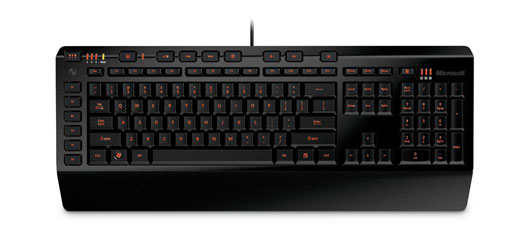
So the big question is does this really work? The answer is yes, yes it does. The anti-ghosting feature works really well and I was able to hit all kinds of keystrokes and macros with a really fast response time. During one test I was able to fire off 3 macros and use a push to talk button in the middle of one fight. While this wasn’t a full keyboard test it was pretty impressive that there was no lag in response time.
I am a MMO gamer and macros are a key for high level playing. Setting up the macros is really easy using the included software and I had no problems hitting what I needed on the fly. The great thing about the X4 is that you can set up different profiles depending on what games you play. The Sidewinder X4 offers gamers up to three profiles to create and switch between on the fly. The profiles also auto switch so if you enter a different game it will recognize that profile. I tested the profile switching going from a MMO to a FPS and it worked great. Very easy to use and very fun for every level of gamer. If you wanted to switch profiles mid game for different events it is easily done via the keyboard.
For non hardcore gamers you probably wont use the macro or profile features quite often. Fear not fellow gamers this keyboard is still great for the casual gamer. The response rate from the keyboard is fantastic and it works great for all user levels. As standard with most gaming keyboards these days there are media controls along the top of the keyboard to control your media files. I did find that the caps lock button was way too close to the main keyset for my large hands. There were plenty of times where I found myself hitting that caps lock key while typing only to have to go back and erase the ‘yelling’ words. A little bit of spacing between the main keyset and the side keys would have been nice. If you have small or normal sized hands this should be no problem for you.
FINAL THOUGHTS
The Sidewinder X4 keyboard is a great keyboard for all levels of gamer. If you are a hardcore, tournament-gamer you are going to love all the options as well as the quick response rate and anti-ghosting technology. For casual gamers, the keyboard’s ease of use will have this sitting on your desk for a long time. Microsoft’s Sidewinder X4 is a solid product and a welcome addition to the gaming keyboard market.
*DISCLOSURE: Microsoft provided GamingShogun.com with one Sidewinder X4 keyboard for this review.

Bungie has released a new multiplayer trailer for their upcoming Halo: Reach. The new trailer features a ton of alpha footage, showing off the various gameplay modes available, including ‘Invasion’ and ‘Head Hunter’. Reach is scheduled for release this fall.

Capcom has announced that the demo for its upcoming racer, MotoGP 09/10 will hit the Xbox LIVE Marketplace and PlayStation Network this Thursday. The demo will feature a race for three of the game’s gameplay modes – the full release will be out on March 16th.
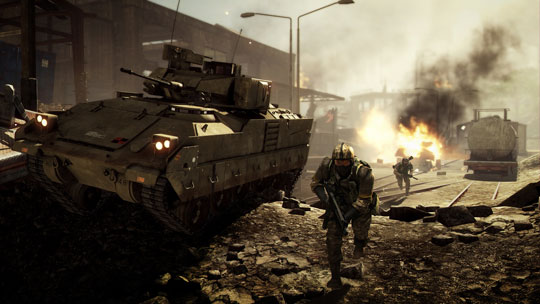
EA and DICE have released the official launch trailer for Battlefield: Bad Company 2. The soon to be released war machine is set to hit store shelves on March 2nd for the Xbox 360, PS3, and PC gaming systems. Let us know what you think about the trailer on our official forums.

EA and Black Box have released a new Skate 3 Making The Game trailer showing off the Port Carverton University location. Port Carverton is filled with your traditional college town areas and plenty of places to fall on your face. Skate 3 releases this May for the Xbox 360 and PS3 systems.